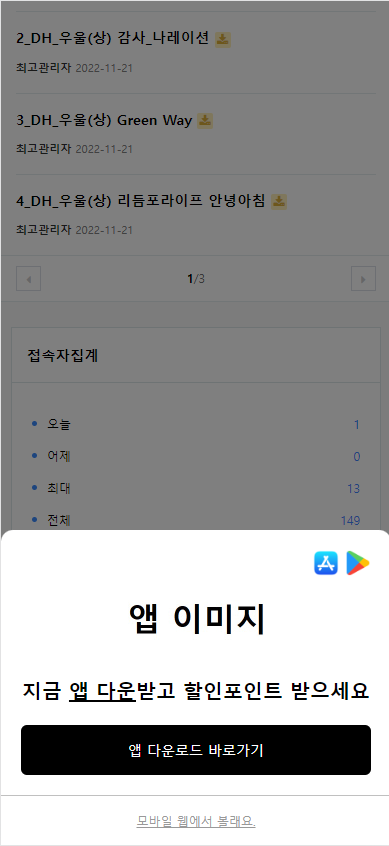
모바일 앱스토어 바로가기 하단팝업 달기
[code]
<?php //if (defined("_INDEX_")) { ?>
<div id="appDown">
<div class="inner">
<div class="cont">
<div class="app">
<img src="/img/icon_app_store.png">
<img src="/img/icon_google_play.png">
</div>
<div class="image">
<img src="/img/appdown.jpg">
</div>
<div class="text">지금 <span>앱 다운</span>받고 할인포인트 받으세요<BR>
</div>
<div class="download">
<a href="https://play.google.com/store/apps/details?id=com.fix.no1" target="_blank">앱 다운로드 바로가기</a>
</div>
</div>
<div class="close"><button type="button" class="closeApp">모바일 웹에서 볼래요.</div>
<script>
$(".closeApp").on('click',function(){
$("#appDown").css("display","none");
});
</script>
</div>
</div>
<?php //}?>
[/code]
[code]
<style>
@media (max-width: 1200px) {
#appDown{display:flex;flex-direction:column;justify-content:flex-end;position:fixed;bottom:0;left:0;width:100%;height: 100%;background: rgba(0,0,0,0.5);z-index: 1000000;}
#appDown .inner{background:#ffffff;border-radius:12px 12px 0 0;padding: 0 0 50px 0;}
#appDown .cont{padding: 20px;}
#appDown .cont .app{display: flex;align-items: center;justify-content: flex-end;}
#appDown .cont .app img{width: auto;height: 26px;}
#appDown .cont .app img + img{margin-left: 6px;}
#appDown .cont .image{display: flex;align-items: center;justify-content: center;}
#appDown .cont .image img{width: auto;height: 80px;}
#appDown .cont .text{padding: 20px 0;line-height: 29px;font-size: 20px;text-align: center;font-weight: bold;}
#appDown .cont .text span{text-decoration:underline}
#appDown .cont .download{}
#appDown .cont .download a{display: flex;align-items: center;justify-content: center;width: 100%;height: 50px;border-radius: 6px;background: #000;color: #ffffff;font-size: 14px;}
#appDown .close{position: absolute;bottom: 0;left: 0;width: 100%;height: 50px;display: flex;background: #ffffff;border-top: 1px solid #c0c0c0;}
#appDown .close .closeApp{width: 100%;border: 0;outline: 0;background: #ffffff;text-decoration: underline;font-size: 12px;color: #999;}}
</style>
[/code]




댓글 10개
그런데 모바일 웹에서 볼래요 누르면
계속 뜨는데요...안뜨게 하는 방법 있으면 좋겠네요
<?php //} ?>
이거 해제하시면 메인에서만 뜹니다.
모바일 웹에서 볼래요. 누르면 오늘 하루닫기 ? 기능이 있음 좋을거 같습니다.