

jQuery Selector - DOM 계층(Hierarchy)을 이용한 요소 접근 2
jQuery 계층 접근 셀렉터의 종류
jQuery에서는 다음과 같이 4개의 계층 접근용 셀렉터를 지원하고 있으며, 각각의 사용법에 대해서는 간단한 예제와 함께 알아 보도록 하겠습니다.
|
형식(셀렉터) |
셀렉터 표현식 |
|
Child Selector |
$(“parent > child”) |
|
Descendant Selector |
$(“ancestor descendant”) |
|
Next Adjacent Selector |
$(“prev + next”) |
|
Next Siblings Selector |
$(“prev ~ siblings”) |
| 표 1. [jQuery 계층(Hierarchy) 셀렉터의 종류] | |
Child Selector : $(“Parent > Child”)
부모(Parent) 요소 바로 아래 자식(Child)인 요소를 반환 합니다.
최근에 출시된 대부분의 브라우저를 지원하고 있으나, IE6를 포함한 이전의 브라우저에서는 지원을 하고 있지 않으니 사용에 각별한 주의가 필요합니다. IE6를 포함한 이전의 브라우저의 지원을 위해서는 3번째 강좌에서 설명한 기본 셀렉터를 사용 하시기 바랍니다. 기본 셀렉터의 경우 모든 브라우저를 지원하고 있으므로 브라우저의 버전이나, 종류에 신경 쓸 필요가 없습니다.
<html xmlns="http://www.w3.org/1999/xhtml">
<head>
    <title>jQuery Selector</title>
    <link href="../Styles/Site.css" rel="stylesheet" type="text/css" />
    <style>
        div { background-color:#EEEEEE; padding:10px; }
    </style>
    <script src="http://code.jquery.com/jquery-latest.js"></script>
    <script type="text/javascript">
        $(document).ready(function () {
            $("ul.siteUrl > li").css("border", "1px solid #ff0000");
        });
    </script>
</head>
<body style="padding:10px;">
    <h2>jQuery 시작 Selector</h2>
    <p>jQuery에 대한 자세한 내용을 보려면 jquery.com 을 방문하세요.</p>
    <div>
        <ul class="siteUrl">
            <li>Sqler : http://www.sqler.com</li>
            <li>jQuery : http://jquery.com</li>
            <li>
                <ul>
                    <li>Blog : http://www.hows.kr</li>
                    <li>Community : http://www.hoons.kr</li>
                </ul>
            </li>
            <li>Items</li>
            <li>Items</li>
            <li>Items</li>
        </ul>
    </div>
</body>
</html>
[부모요소(ul)에서 자식요소(li)과 일치하는 항목 선택]
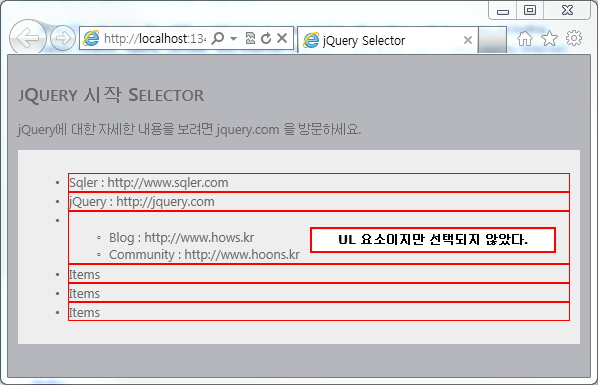
[부모요소(ul)에서 자식요소(li)과 일치하는 항목 선택된 모습]
$("ul.siteUrl > li").css("border", "1px solid #ff0000"); 코드설명
1. HTML 문서에서 ul 요소 중 “siteUrl”이란 클래스 명을 가진 요소를 찾습니다.
2. 1번 항목에서 찾은 요소의 자식 중에 “li” 항목과 일치하는 요소를 찾습니다.
3. 2번 항목에서 찾은 요소를 jQuery의 “css” 메소드를 이용해 테두리 값을 빨강색으로 변경합니다.
Descendant Selector : $(“ancestor descendant”)
조상(Ancestor)과 일치하는 요소에 포함된 모든 후손(Descendant)중에 후손의 요소와 일치하는 모든 항목을 반환합니다. 부모(Parent)와 자식(Child)간의 관계가 조상(Ancestor)과 후손(Descendant)로 변경이 되었을 뿐 Child 셀렉터와 동일한 기능을 제공 합니다.
<html xmlns="http://www.w3.org/1999/xhtml">
<head>
    <title>jQuery Selector</title>
    <link href="../Styles/Site.css" rel="stylesheet" type="text/css" />
    <style>div { background-color:#EEEEEE; padding:10px; }</style>
    <script src="http://code.jquery.com/jquery-latest.js"></script>
    <script type="text/javascript">
        $(document).ready(function () {
            $("#siteUrl1 > li").css("border", "1px solid #ff0000");
            $("#siteUrl2 li").css("border", "1px solid blue");
        });
    </script>
</head>
<body style="padding:10px;">
    <h2>jQuery 시작 Selector</h2>
    <p>jQuery에 대한 자세한 내용을 보려면 jquery.com 을 방문하세요.</p>
    <div>
        <ul id="siteUrl1">
            <li>Sqler : http://www.sqler.com</li>
            <li>jQuery : http://jquery.com</li>
            <li>
                <ul>
                    <li>Blog : http://www.hows.kr</li>
                    <li>Community : http://www.hoons.kr</li>
                </ul>
            </li>
            <li>Items</li>
            <li>Items</li>
            <li>Items</li>
        </ul>
        <ul id="siteUrl2">
            <li>Sqler : http://www.sqler.com</li>
            <li>jQuery : http://jquery.com</li>
            <li>
                <ul>
                    <li>Blog : http://www.hows.kr</li>
                    <li>Community : http://www.hoons.kr</li>
                </ul>
            </li>
            <li>Items</li>
            <li>Items</li>
            <li>Items</li>
        </ul>
    </div>
</body>
</html>
[자식(Child) 셀렉터와 후손(Descendant) 셀렉터]
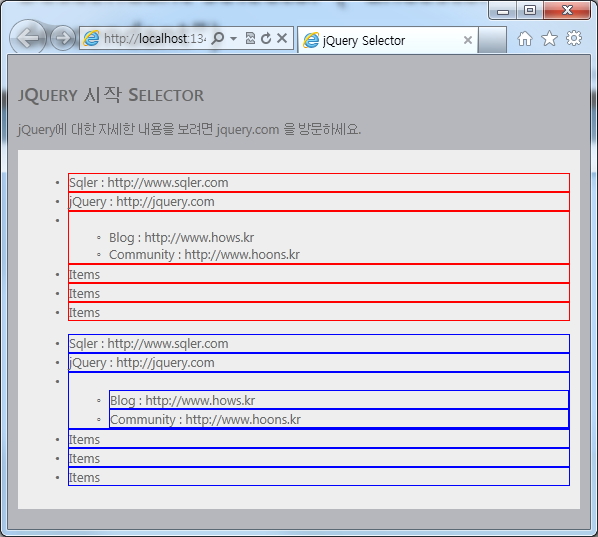
[자식(Child) 셀렉터와 후손(Descendant) 셀렉터에 의해 선택 된 모습]
빨강색으로 표시된 부분은 자식(Child) 셀렉터를 이용하여 개체를 선택한 모습이며, 파랑 색으로 표시된 부분은 후손(Descendant) 셀렉터에 의해 개체를 선택한 모습입니다.
자식(Child) 셀렉터를 이용했을 경우 ul -> li -> ul -> li 에 해당되는 요소는 선택이 되지 않고 바로 아래에 있는 자식(Child) 요소만 선택이 된 반면에 후손(Descendant) 셀렉터를 이용했을 경우 li에 해당하는 모든 요소를 선택 한 것을 확인 할 수 있습니다.
간단한 문법의 차이로 인해서 반환하는 요소의 결과의 차이가 많으니 두 가지 셀렉터의 차이점을 확실히 이해를 하시는 것은 매우 중요합니다.
Next Adjacent Selector : $(“prev + next”)
이전에는 요소와 요소 사이의 상, 하 관계를 통해 일치하는 항목을 찾았다면 이번 셀렉터와 다음에 설명드릴 셀렉터는 평행관계를 통해 일치하는 요소를 반환합니다.
Prev 요소 바로 다음에 나오는 형제(Adjacent) 수준의 next 요소와 일치하는 항목을 반환합니다.
<html xmlns="http://www.w3.org/1999/xhtml">
<head>
    <title>jQuery Selector</title>
    <link href="../Styles/Site.css" rel="stylesheet" type="text/css" />
    <style>
        div { background-color:#EEEEEE; padding:10px; }
    </style>
    <script src="http://code.jquery.com/jquery-latest.js"></script>
    <script type="text/javascript">
        $(document).ready(function () {
            $("label + input").css("border", "1px solid #ff0000");
        });
    </script>
</head>
<body>
    <h2>jQuery 시작 Selector</h2>
    <p>jQuery에 대한 자세한 내용을 보려면 jquery.com 을 방문하세요.</p>
    <div>
        <form>
            <label>Name:</label>
            <input name="name" />

            <fieldset>
                <label>Newsletter:</label>
                <input name="newsletter" />
            </fieldset>

        </form>
        <input name="none" />
    </div>
</body>
</html>
[label 다음의 input의 요소와 형제 수준이 동일한 요소를 찾습니다.]
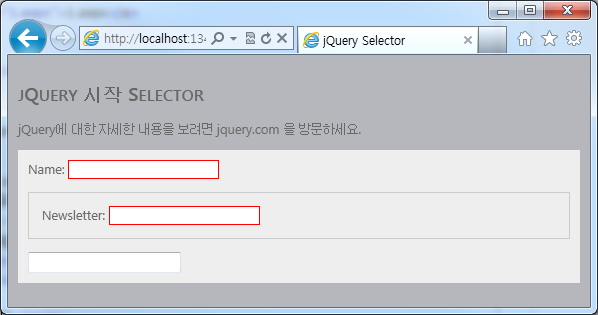
[지정한 요소와 형제 수준이 동일한 요소의 모습]
$("label + input").css("border", "1px solid #ff0000");
<label> 요소 바로 다음(형제요소)에 있는 <input> 요소를 찾습니다. 동일한 패턴으로 된 모든 요소를 찾아 반환합니다.
$(“label > input”) 부분과 혼동하시는 분들이 많아 두 셀렉터의 차이를 다시 설명하자면 $(“label > input”)의 경우 <label>을 부모로 가지고 있는 <input> 요소를 찾는 것이고, $(“label + input”)의 경우는 <label>과 평등한 관계에 있는 <input>요소를 찾는 것 입니다.
Next Siblings Selector : $(“prev ~ siblings”)
Prev 요소 이후에 형제 요소 중 siblings와 동일한 요소를 반환합니다.
$(“#prev ~ div”)의 경우 id의 값이 prev인 요소를 찾고 해당 요소를 제외한 다음 형제 요소 중에 div와 동일한 요소를 찾아 반환을 합니다.
<html xmlns="http://www.w3.org/1999/xhtml">
<head>
    <title>jQuery Selector</title>
    <link href="../Styles/Site.css" rel="stylesheet" type="text/css" />
    <style>
        div,span
        {
            width:100px;
            height:80px;
            float:left;
            padding:10px;
            margin:10px;
            background-color:#EEEEEE;
        }
        div#small
        {
            width:60px;
            height:20px;
            font-size:12px;
            background:#fab;
        }
    </style>
    <script src="http://code.jquery.com/jquery-latest.js"></script>
    <script type="text/javascript">
        $(document).ready(function () {
            $("#prev ~ div").css("border", "3px groove blue");
        });
    </script>
</head>
<body style="padding:10px;">
    <h2>jQuery 시작 Selector</h2>
    <p id="content">jQuery에 대한 자세한 내용을 보려면 jquery.com 을 방문하세요.</p>
    <div>div (doesn't match since before #prev)</div>
    <span id="prev">span#prev</span>
    <div>div sibling</div>
    <div>div sibling
        <div id="small"
|
댓글을 작성하시려면 로그인이 필요합니다.