

스마트에디터 반응형 CSS 추가
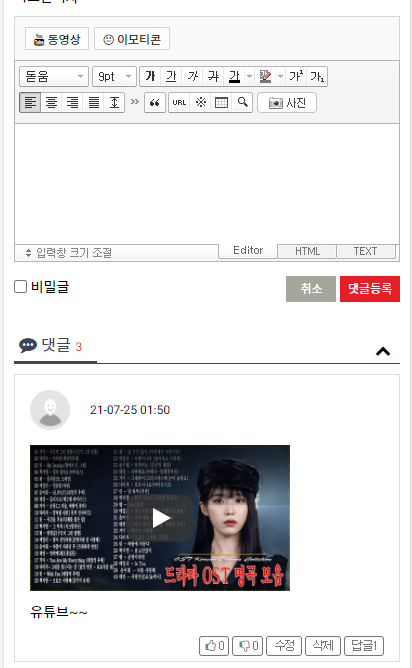
640 이하에서만 맞추면 될 것 같아서 640 이하로만 맞췄습니다.
/plugin/editor/smartdeitor2/css/ko_KR/smart_editor2.css
파일 맨 아래에
@media (max-width: 640px){
#smart_editor2 .se2_text_tool { position: relative; display: flex; flex-wrap: wrap; z-index: 30; padding: 5px; background: #f4f4f4 url(../../img/bg_text_tool.gif) 0 0 repeat-x; border-bottom: 1px solid #b5b5b5; }
#smart_editor2 .se2_text_tool > ul { position: relative; width: auto; margin-right: 3px; margin-bottom: 5px; padding: 0; }
#smart_editor2 .se2_text_tool > ul:last-child { margin-right: 0; }
#smart_editor2 .se2_text_tool li.husky_seditor_ui_fontName,
#smart_editor2 .se2_text_tool li.husky_seditor_ui_fontSize,
#smart_editor2 .se2_text_tool li.husky_seditor_ui_fontColor,
#smart_editor2 .se2_text_tool li.husky_seditor_ui_BGColor { z-index: 60; }
#smart_editor2 .se2_text_tool .se2_font_type li { margin-left: 0; }
#smart_editor2 .se2_text_tool .se2_font_type li:first-child { margin-left: -1px; margin-right: 3px; }
#smart_editor2 .se2_text_tool .se2_multy { position:relative; float: left; display: inline; border: 0; margin-right: 3px; padding-left: 1px; white-space: nowrap; }
#smart_editor2 .se2_text_tool .se2_multy .se2_photo { height: 21px; width: 60px; text-align: center; background: #fff; border: 1px solid #c3c3c3; border-radius: .25rem; }
#smart_editor2 .se2_text_tool .se2_multy .se2_photo .se2_icon { height: 21px; line-height: 21px; margin: -5px 2px 0 -1px; }
#smart_editor2 .se2_text_tool .se2_multy .se2_photo .se2_mntxt { height: 21px; line-height: 21px; }
#smart_editor2 .se2_inputarea_controller { width: auto; padding-left: 10px; }
}
추가해 주시면 됩니다.
단, 모바일에서 특문 사용 시 레이어가 벗어나는 건 잡을려니 손이 너무 많이 갈듯 해서 그냥 포기했네요;
댓글 8개
#smart_editor2{margin-right:1px !important;min-width:100px !important}
@media screen and (max-width: 640px){
#smart_editor2 .se2_text_tool ul:nth-child(4n){clear:both;}
#smart_editor2 .se2_text_tool ul{margin-bottom:4px}
#smart_editor2 .se2_text_tool ul:nth-child(n+4){margin-bottom:0}
#smart_editor2 .se2_text_tool .se2_multy,#smart_editor2 .se2_text_tool .se2_multy button, #smart_editor2 .se2_text_tool .se2_multy button span{height:54px}
}
@media screen and (max-width: 515px){
#smart_editor2 .se2_text_tool ul:nth-child(3n){clear:both;margin-left:4px}
#smart_editor2 .se2_text_tool ul:nth-child(6n),#smart_editor2 .se2_text_tool ul:nth-child(4n){clear:none;margin-left:0}
#smart_editor2 .se2_text_tool ul:nth-child(n+3){margin-bottom:0}
}
@media screen and (max-width: 370px){
#smart_editor2 .se2_text_tool ul:nth-child(2n){clear:both;margin-left:4px}
#smart_editor2 .se2_text_tool ul:nth-child(3n){clear:both;margin-left:4px}
#smart_editor2 .se2_text_tool ul:nth-child(6n),#smart_editor2 .se2_text_tool ul:nth-child(4n){clear:none;margin-left:0}
#smart_editor2 .se2_text_tool ul:nth-child(n+3){margin-bottom:0}
#smart_editor2 .se2_text_tool .se2_multy,#smart_editor2 .se2_text_tool .se2_multy button, #smart_editor2 .se2_text_tool .se2_multy button span{height:79px}
}
@media screen and (max-width: 325px){
#smart_editor2 .se2_text_tool .se2_multy,#smart_editor2 .se2_text_tool .se2_multy button, #smart_editor2 .se2_text_tool .se2_multy button span{height:29px;}
#smart_editor2 .se2_text_tool .se2_multy{border-bottom:1px solid #e0dedf}
}
[/code]
아래사진처럼요.. (사진은 다른거긴 하지만 설명을 위해서 첨부)
[http://sir.kr/data/editor/2111/8ab355821af843f379305d7be718d748_1637219484_6263.png]