

게시판에서 png파일(사진)을 첨부하면, 썸네일 최신글에서 사진이 안나오고 엑박이 됩니다.
jpg파일 같은건 문제가 없습니다.
엑박 경로를 보니..
http://jeongbo-partner.com/board/data/file/news/1915816669_Yjmv83QL_001ec949fb1b14a1b3fc01.png.thumb

이렇게 되어 있네요.
초보자라서 어디가 문제인지 모르겠습니다...고수님들 도와주십시오.....

아래는 최신글 스킨입니다.
latest.skin.php
<?php
if(defined('_GNUBOARD_') == false)
{
exit();
}
{
exit();
}
if(defined('_PLUGIN_') == false)
{
define('_PLUGIN_', true);
include_once($latest_skin_path . '/latest.lib.php');
echo "<script type=\"text/javascript\">\n";
echo "var COUNT = new Array();\n";
echo "function layer(id, no)\n";
echo "{\n";
echo "for(var i = 0; i < COUNT[id]; i++) document.getElementById(id + \"_\" + i).style.display = \"none\";\n";
echo "document.getElementById(id + \"_\" + no).style.display = \"block\";\n";
echo "return;\n";
echo "}\n";
echo "</script>";
}
{
define('_PLUGIN_', true);
include_once($latest_skin_path . '/latest.lib.php');
echo "<script type=\"text/javascript\">\n";
echo "var COUNT = new Array();\n";
echo "function layer(id, no)\n";
echo "{\n";
echo "for(var i = 0; i < COUNT[id]; i++) document.getElementById(id + \"_\" + i).style.display = \"none\";\n";
echo "document.getElementById(id + \"_\" + no).style.display = \"block\";\n";
echo "return;\n";
echo "}\n";
echo "</script>";
}
list($width, $height, $default) = explode(',', $options);
?>
<style type="text/css">
div.img {border:2px solid #b9c695;}
div.img:hover {border:2px solid #ea6f0b;}
table.link a {color:#666666; }
table.link a:hover {color:#ea6f0b; text-decoration:underline;}
</style>
<script type="text/javascript">COUNT["<?php echo $bo_table; ?>"] = <?php echo count($list); ?>;</script>
<table width="100%" border="0" cellspacing="0" cellpadding="0">
<tr>
<td width="154" align="center">
<div style="width:150px;height:110px;" class="img">
<?php for($i = 0; $i < count($list); $i++){ ?><div id="<?php echo "{$bo_table}_{$i}"; ?>" style="<?php if($i == 0) echo 'display:block;'; else echo 'display:none;'; ?>"><a href="<?php echo $list[$i]['href']; ?>" onfocus="this.blur();"><?php echo make_thumbnail("{$list[$i]['file']['0']['path']}/{$list[$i]['file']['0']['file']}", "{$list[$i]['file']['0']['path']}/{$list[$i]['file']['0']['file']}.thumb", $width, $height, $default); ?></a></div>
<?php } ?>
</div>
</td>
<td width="2"></td>
<td>
<table width="100%" border="0" cellspacing="0" cellpadding="2" class="link">
<?php for($i = 0; $i < count($list); $i++){ ?>
<tr>
<td height="18" style="border-bottom:1px #b9c695 dotted;"><img src="<?php echo $latest_skin_path; ?>/img/arrow.gif" border="0" align="absmiddle">
<? echo $list[$i]['icon_reply'] . " ";?>
<a href="<?php echo $list[$i]['href']; ?>" onmouseover="layer('<?php echo $bo_table; ?>', '<?php echo $i; ?>');" onfocus="this.blur();"><?php echo str_replace('。ヲ', '', $list[$i]['subject']); if ($list[$i]['comment_cnt'])
echo " <a href=\"{$list[$i]['comment_href']}\"><span style='font-size:9pt; color:#ea6f0b;'>{$list[$i]['comment_cnt']}</span></a>";
echo " " . $list[$i][icon_new];?></a>
</td>
<td width="40" align=right style='border-bottom:1px #b9c695 dotted;'><span style='font-size:12px; color:#666666;'><?=$list[$i][datetime2]?></span></td>
</tr>
<?php } ?>
</table>
</td>
</tr>
</table>
<style type="text/css">
div.img {border:2px solid #b9c695;}
div.img:hover {border:2px solid #ea6f0b;}
table.link a {color:#666666; }
table.link a:hover {color:#ea6f0b; text-decoration:underline;}
</style>
<script type="text/javascript">COUNT["<?php echo $bo_table; ?>"] = <?php echo count($list); ?>;</script>
<table width="100%" border="0" cellspacing="0" cellpadding="0">
<tr>
<td width="154" align="center">
<div style="width:150px;height:110px;" class="img">
<?php for($i = 0; $i < count($list); $i++){ ?><div id="<?php echo "{$bo_table}_{$i}"; ?>" style="<?php if($i == 0) echo 'display:block;'; else echo 'display:none;'; ?>"><a href="<?php echo $list[$i]['href']; ?>" onfocus="this.blur();"><?php echo make_thumbnail("{$list[$i]['file']['0']['path']}/{$list[$i]['file']['0']['file']}", "{$list[$i]['file']['0']['path']}/{$list[$i]['file']['0']['file']}.thumb", $width, $height, $default); ?></a></div>
<?php } ?>
</div>
</td>
<td width="2"></td>
<td>
<table width="100%" border="0" cellspacing="0" cellpadding="2" class="link">
<?php for($i = 0; $i < count($list); $i++){ ?>
<tr>
<td height="18" style="border-bottom:1px #b9c695 dotted;"><img src="<?php echo $latest_skin_path; ?>/img/arrow.gif" border="0" align="absmiddle">
<? echo $list[$i]['icon_reply'] . " ";?>
<a href="<?php echo $list[$i]['href']; ?>" onmouseover="layer('<?php echo $bo_table; ?>', '<?php echo $i; ?>');" onfocus="this.blur();"><?php echo str_replace('。ヲ', '', $list[$i]['subject']); if ($list[$i]['comment_cnt'])
echo " <a href=\"{$list[$i]['comment_href']}\"><span style='font-size:9pt; color:#ea6f0b;'>{$list[$i]['comment_cnt']}</span></a>";
echo " " . $list[$i][icon_new];?></a>
</td>
<td width="40" align=right style='border-bottom:1px #b9c695 dotted;'><span style='font-size:12px; color:#666666;'><?=$list[$i][datetime2]?></span></td>
</tr>
<?php } ?>
</table>
</td>
</tr>
</table>
latest.lib.php
<?php
function make_thumbnail($exist, $creat, $width, $height, $default = null)
{
global $g4;
if(file_exists($exist) == true && in_array(strtolower(array_pop(explode('.', $exist))), array('gif', 'jpg', 'jpeg', 'png')) == true)
{
if(file_exists($creat) == false)
{
list($img['width'], $img['height'], $img['type']) = getimagesize($exist);
switch($img['type'])
{
case '1' :
{
global $g4;
if(file_exists($exist) == true && in_array(strtolower(array_pop(explode('.', $exist))), array('gif', 'jpg', 'jpeg', 'png')) == true)
{
if(file_exists($creat) == false)
{
list($img['width'], $img['height'], $img['type']) = getimagesize($exist);
switch($img['type'])
{
case '1' :
$src['image'] = imagecreatefromgif($exist);
$dst['image'] = imagecreate($width, $height);
break;
$dst['image'] = imagecreate($width, $height);
break;
case '2' :
$src['image'] = imagecreatefromjpeg($exist);
$dst['image'] = imagecreatetruecolor($width, $height);
break;
$dst['image'] = imagecreatetruecolor($width, $height);
break;
case '3' :
$src['image'] = imagecreatefrompng($exist);
$dst['image'] = imagecreatetruecolor($width, $height);
break;
}
$dst['color'] = imagecolorallocate($dst['image'], 255, 255, 255);
imagefilledrectangle($dst['image'], 0, 0, $width, $height, $dst['color']);
imagecopyresampled($dst['image'], $src['image'], 0, 0, 0, 0, $width, $height, $img['width'], $img['height']);
switch($img['type'])
{
case '1' :
$dst['image'] = imagecreatetruecolor($width, $height);
break;
}
$dst['color'] = imagecolorallocate($dst['image'], 255, 255, 255);
imagefilledrectangle($dst['image'], 0, 0, $width, $height, $dst['color']);
imagecopyresampled($dst['image'], $src['image'], 0, 0, 0, 0, $width, $height, $img['width'], $img['height']);
switch($img['type'])
{
case '1' :
imagegif($dst['image'], $creat);
break;
break;
case '2' :
imagejpeg($dst['image'], $creat, 130);
break;
break;
case '3' :
imagepng($dst['image'], $creat, 100);
break;
}
imagedestroy($src['image']);
imagedestroy($dst['image']);
}
$return = "<img src=\"{$creat}\" border='0'>";
}
else
{
$return = $default;
}
return $return;
}
break;
}
imagedestroy($src['image']);
imagedestroy($dst['image']);
}
$return = "<img src=\"{$creat}\" border='0'>";
}
else
{
$return = $default;
}
return $return;
}
?>
답변 4개 / 댓글 5개
채택된 답변
+20 포인트
위 소스를 가져다가 실험을 해 봤는 데 소스를 정확하게 분석하기는
지루하고 해서 다음 처럼 그누보드5에 있는 썸라이브러리를 이용했더니
잘 됩니다. (원하시는건지는 모르겠지만...ㅎㅎ)
latest.lib.php파일을 사용하지 않고 그누보드5의 lib디렉토리에 있는 thumbnail.lib.php 파일을 사용.
다음 처럼 latest.skin.php을 바꿔 보세요.
<?php
if(defined('_GNUBOARD_') == false)
{
exit();
}
if(defined('_PLUGIN_') == false)
{
define('_PLUGIN_', true);
include_once(G5_LIB_PATH.'/thumbnail.lib.php');
//include_once($latest_skin_path . '/latest.lib.php');
$imgwidth = 150; //표시할 이미지의 가로사이즈
$imgheight = 110; //표시할 이미지의 세로사이즈
echo "<script type=\"text/javascript\">\n";
echo "var COUNT = new Array();\n";
echo "function layer(id, no)\n";
echo "{\n";
echo "for(var i = 0; i < COUNT[id]; i++) document.getElementById(id + \"_\" + i).style.display = \"none\";\n";
echo "document.getElementById(id + \"_\" + no).style.display = \"block\";\n";
echo "return;\n";
echo "}\n";
echo "</script>";
}
list($width, $height, $default) = explode(',', $options);
?>
<style type="text/css">
div.img {border:2px solid #b9c695;}
div.img:hover {border:2px solid #ea6f0b;}
table.link a {color:#666666; }
table.link a:hover {color:#ea6f0b; text-decoration:underline;}
</style>
<script type="text/javascript">COUNT["<?php echo $bo_table; ?>"] = <?php echo count($list); ?>;</script>
<table width="100%" border="0" cellspacing="0" cellpadding="0">
<tr>
<td width="154" align="center">
<div style="width:150px;height:110px;" class="img">
<?php for($i = 0; $i < count($list); $i++){ ?><div id="<?php echo "{$bo_table}_{$i}"; ?>" style="<?php if($i == 0) echo 'display:block;'; else echo 'display:none;'; ?>"><a href="<?php echo $list[$i]['href']; ?>" onfocus="this.blur();">
<?php
$thumb = get_list_thumbnail($bo_table, $list[$i]['wr_id'], $imgwidth, $imgheight);
if($thumb['src']) {
$img_content = '<img class="img_left" src="'.$thumb['src'].'" alt="'.$list[$i]['subject'].'" width="'.$imgwidth.'" height="'.$imgheight.'">';
} else {
$img_content = 'NO IMAGE';
}
echo $img_content;
?>
^^^^^^^^^^^^^^^^^^^^^^^^^^^^^^^^^^^^^^^^^^
이하 생략
latest.skin.php 파일에서
make_thumb() 함수를 호출하면서 $width, $height 값을 가지고 가야할것 같은데
위 소스만 봐서는 그렇지 못하는것 같습니다.
latest.skin.php 파일 상단에
$width = 130 ; //예를 들어 가로사이즈를 130이라 했을 때
$height = 100 ; 으로 설정을 한 후 다시 시도해 보세요.
네이비컬러 님,,,
그런데 썸네일 이미지가 지정한 사이즈로 안나오고 원본사이즈로 나오네요...
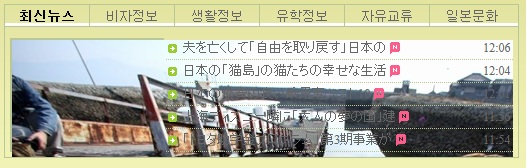
썸네일 생성시 파일이름 맨 뒤에 확장자로 .thumb가 붙어 보이지 않는 경우입니다.
위 소스중
<?php echo make_thumbnail("{$list[$i]['file']['0']['path']}/{$list[$i]['file']['0']['file']}", "{$list[$i]['file']['0']['path']}/{$list[$i]['file']['0']['file']}.thumb", $width, $height, $default); ?></a></div>
<?php } ?> 에서
<?php } ?> 에서
.thumb(마침표 포함)을 제거후 시도해 보세요.
답변을 작성하려면 로그인이 필요합니다.
좀 더 연구를 해봐야 겠습니다.....ㅎㅎ