

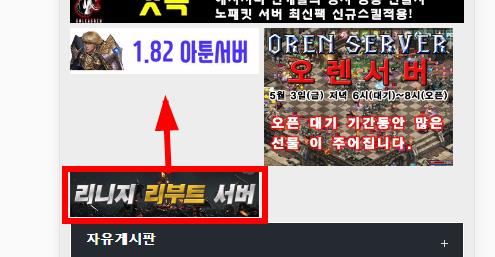
답변 3개 / 댓글 1개
채택된 답변
+20 포인트

혹시 해당소스들을 씌워준 box 태그가 있는가요?
Copy
<div class='box'>

  <div class="col-xs-06">
    <a href="<?php echo $list[$i]['wr_link1'] ?>" target="_blank"><?php echo $img_content; ?></a>
  </div>

  <div class="col-xs-06">
    <a href="<?php echo $list[$i]['wr_link1'] ?>" target="_blank"><?php echo $img_content; ?></a>
  </div>

</div>
이런식으로요
답변을 작성하려면 로그인이 필요합니다.
if (!defined('_GNUBOARD_')) exit; // 개별 페이지 접근 불가
include_once(G5_LIB_PATH.'/thumbnail.lib.php');
// add_stylesheet('css 구문', 출력순서); 숫자가 작을 수록 먼저 출력됨
//('<link rel="stylesheet" href="'.$latest_skin_url.'/style.css">', 0);
$thumb_width = 48;
$thumb_height = 80;
?>
<style>
.col-xs-06 {
position: relative;
float:left;
width:190px;
max-width:48.5%;
margin:0 5px 5px 0;
}
</style>
<?php
for ($i=0; $i<count($list); $i++) {
if($date = date("Y-m-d") <= $list[$i]['wr_5']){
?>
<div class="col-xs-06">
<?php
$thumb = get_list_thumbnail($bo_table, $list[$i]['wr_id'], $thumb_width, $thumb_height, false, true);
$img = $thumb['src'];
$img_content = '<img src="'.$img.'">';
?>
<a href="<?php echo $list[$i]['wr_link1'] ?>" target="_blank"><?php echo $img_content; ?></a>
</div>
<?php }}?>