

json으로 상품들의 정보를 끌어갈수 있게 만들고 있습니다.
상품의 기본적인 정보는 다 잘 됐는데, 옵션 부분을 어떻게 해야될지 모르겠습니다...ㅠ
Copy
header('Content-Type:application/json; charset=utf-8');
$json_array = array();
$sql =" select * from {$g5['g5_shop_item_table']} where ca_id = '$ca_id' ";

$result = sql_query($sql);
for ($i=0; $row = sql_fetch_array($result); $i++) {

-

- 생략

$json_array[$i]["it_1"] = $row["it_1"];
}

$json_array = json_encode($json_array, JSON_UNESCAPED_UNICODE );
$json_array = prettyPrint( $json_array );
echo prettyPrint( $json_array );
요런식으로 만들었는데...
옵션도 저런식으로 만드니깐 ...
뭔가 이상하게 나오더라고요 ㅠ
xml로는 아래와 같이 햇는데 ㅠ
Copy
<?

echo "<pOptions>\n";

$sql3 = " select * from {$g5['g5_shop_item_option_table']} where io_use = '1' and it_id = '{$row['it_id']}' order by io_no asc ";
$result3 = sql_query($sql3);

for($i=0; $row3=sql_fetch_array($result3); $i++) {
$opt_subject = explode(',', $row['it_option_subject']);
?>
<pOption>
<opName><?php echo $opt_subject ; ?></opName>
- 생략-
</pOption>
<?php
}
echo "</pOptions>\n";
}
?>
출력하고,
파싱까지 다 잘 됐거든용 ㅠ
json이 문제라소ㅠㅠ
어떤식으로 json을 만들어야될까요?
|
답변 4개 / 댓글 6개
Copy
header('Content-Type:application/json; charset=utf-8');
$json_array = array();
$sql =" select * from {$g5['g5_shop_item_table']} where ca_id = '$ca_id'  "; //
$result = sql_query($sql);
for ($i=0; $row = sql_fetch_array($result); $i++) {

    $json_array[$i]["code"]= specialchars_replace($row['it_id']); // 상품 고유번호
    $json_array[$i]["cate1"] = $row["ca_id"]; // 1차 카테고리
    // 생략 //
    $json_array[$i]["optionuse"] = $useoption; // 옵션 유무


    if($useoption =='2'){ // 옵션이 있으면

        $sql3 = " select * from {$g5['g5_shop_item_option_table']} where io_type = '0' and io_use = '1' and it_id = '{$row['it_id']}' order by io_no asc ";
        $result3 = sql_query($sql3);

        for($i=0; $row3=sql_fetch_array($result3); $i++) {
            $opt_subject = explode(',', $row['it_option_subject']);

            $json_array[$i]["opName"] = $opt_subject;

        }
    }
}

$json_array = json_encode($json_array, JSON_UNESCAPED_UNICODE );
$json_array = prettyPrint( $json_array );
echo prettyPrint( $json_array );
}
이런식으로 했습니다...
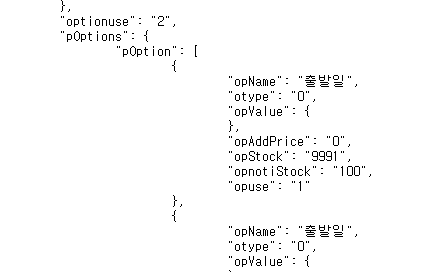
답변에 대한 댓글 2개

die("{\"subject\":\"$subj\",\"content\":\"$cont\"}");
일반적인 json 형식입니다.
prettyPrint 무슨 함수인지는 모르겠으나..
$json = json_encode($json_array);
echo $json;
으로 넘겨주면 될거 같은데.. 안되시나요?
답변을 작성하려면 로그인이 필요합니다.
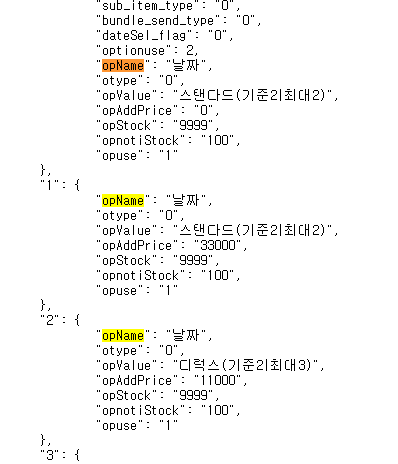
prettyPrint 에서 딱히 순서나 다차원 배열 이동이 없었으면 첫번째 댓글에 올려주신 이미지대로 나오는게 맞습니다.
원하시는 출력방향대로 배열부터 손보셔야할 것 같네요~