

열심히 작업중인데... 이틀째 나아지지가 않습니다.ㅠ
게시판 최신글이 아래쪽으로 잘 나오다가
갑자기 어느순간 옆으로(가로로) 출력이 되고 있는데 왜 그런것일까요?
고수님들, 도와주세요!
|
답변 5개 / 댓글 8개
채택된 답변
+20 포인트
2020-09-13 (일) 00:53:40
쪽지 주신 url로 들어가보니 제가 말한 부분이 맞아요
#business_wrap ul li 부분이 width 값이 32%라 그런 겁니다
#business_wrap에 있는 ul의 li는 모두 저 값이 들어가니까요
말씀하신 가로로 나열되는 내용도 li라 영향을 받는 겁니다.
배너를 3구역으로 나누는 부모 ul li를 클래스를 지정해서 따로 width 값을 주시던
(이 때는 새 클래스는 32% 주시고, 기존의 #business_wrap ul li 부분은 width 지워주시구요)
아니면 지금 문제가 되는 자식 ul li를 클래스를 지정해서 따로 width 값을 주시면 됩니다.
답변에 대한 댓글 5개
2020-09-13 (일) 01:27:09
2020-09-13 (일) 01:36:29
오늘이 sir이용이 처음이라, 중요한걸 놓쳤었네요.
당연히 '채택'해야 마땅하지요^^
포인트가 많으시면 제 이메일을 아실수 있나요?
쌩뚱맞기는 하지만, 혹시 디자인 관련해서 부탁하실거 있으시면,
연락주세요. 제가 할수 있는거면 도와드릴게요.^^
다시한번 감사합니다.
당연히 '채택'해야 마땅하지요^^
포인트가 많으시면 제 이메일을 아실수 있나요?
쌩뚱맞기는 하지만, 혹시 디자인 관련해서 부탁하실거 있으시면,
연락주세요. 제가 할수 있는거면 도와드릴게요.^^
다시한번 감사합니다.
2020-09-13 (일) 00:37:15

말씀하신부분 살펴봤는데, 한열에 공지사항과 더불어 배너2개가 들어가는 구도인데요,
그 총 가로 길이에서 32%씩 총 3구역으로 나눈 것으로 보이는데요...한번만 더 봐주시면 안될까요?
답변에 대한 댓글 1개
2020-09-13 (일) 00:09:53
Copy
<section id="business_wrap">
<div class="business_area">
   <ul>
    <li>
     <div class="board_box">
     <div class="notice_area">
       <ul class="tab">
        <li class="off"><a href="#noticeList1">Notice</a></li>
       </ul>
       <div id="noticeList1" class="active">
        <?php $daon_category = "";

echo theme_lastest('theme/simple', "notice", 3, 24);  ?>
       </div>
      </div>
      </div>

    </li>
</ul>
</div>
</section>
아래는 css 부분입니다.
Copy
#business_wrap {width:100%; padding-top:100px; margin:0 auto; background:url('../image/business_back.jpg')no-repeat; background-position:top center; }
#business_wrap:after{ content:""; display:block; clear:both;}
#business_wrap .business_tit{ width:100%; max-width:1200px; margin:0px auto; padding-bottom:50px;}
#business_wrap .business_tit span { display:block; text-align:center; font-size:1.15em; color:#e3a661; letter-spacing:2px; padding:0 10px; margin:10px 0 10px 0;}
#business_wrap .business_tit p { text-align:center; font-size:1.7em;  line-height:40px; color:#444; font-weight:500; padding:0 10px; margin:0px auto;  }

#business_wrap .business_area {width:100%; max-width:1200px; margin:0 auto;}
#business_wrap .business_area:after {display:block; clear:both; content:'';}

#business_wrap .notice_box { position: relative;width:100%; padding:0 20px 0 20px; }
#business_wrap .contact_box { position: relative; width:100%; padding:0 20px 0 20px; }
#business_wrap .location_box { position: relative; width:100%; padding:0 20px 0 20px; }

#business_wrap .business_area ul li {float:left;  width:32%; height:100%; margin:0; padding:0; text-align:center; background:none; }
#business_wrap .business_area ul li:nth-child(2) {margin:0 2%; }
#business_wrap .business_area ul li img {width:100%; }

#business_wrap .business_area ul li .summary {position:relative; z-index:10;  left:0; top:-80px; width:90%; margin:0 auto;  padding:20px 20px 0 20px; background:#fff; border-radius:10px; transition:all .5s ease; -moz-transition:all .5s ease; -ms-transition:all .5s ease; -webkit-transition:all .5s ease; -o-transition:all .5s ease; }
#business_wrap .business_area ul li:hover .summary { top:-90px; cursor:pointer; }
#business_wrap .business_area ul li .summary .name {height:50px; line-height:50px; color:#000; font-size:1.5em; }
#business_wrap .business_area ul li .summary .sname {padding-bottom:20px; color:#777; font-size:1em;}
#business_wrap .business_area ul li .summary .btn_view {display:inline-block; width:40px; height:40px; cursor:pointer; background: url('../image/btn_plus_off.png')no-repeat; }
#business_wrap .business_area ul li:hover .summary .btn_view {display:inline-block;  width:40px; height:40px; cursor:pointer; background: url('../image/btn_plus_on.png')no-repeat; }

#business_wrap .business_area ul li .notice_area { position: relative; width:95%; padding:0;}
#business_wrap .business_area ul li .notice_area .tab { height:50px; line-height:50px; border-bottom: 1px solid #eee;  box-sizing:border-box;  }
#business_wrap .business_area ul li .notice_area .tab li{float:left; width:30%; color:#777; }
#business_wrap .business_area ul li .notice_area .tab a{display:block; height:50px; line-height:50px; text-align: center; border:0px solid #333; border-bottom: 1px solid #333;  color:#777; box-sizing:border-box; }
#business_wrap .business_area ul li .notice_area .tab a:hover, #business_wrap .business_area ul li .con_box6 .notice_area .tab a:focus {color:#000; }
#business_wrap .business_area ul li .notice_area .tab li:first-child a{border-right:0;}
#business_wrap .business_area ul li .notice_area .tab li:last-child a{border-left:0;}
#business_wrap .business_area ul li .notice_area .tab li.on a{border:0px solid #333; border-bottom:0; color:#fff; background:#333;}
#business_wrap .business_area ul li .notice_area .active{display: block; margin-top:20px; padding:0px; }
#business_wrap .business_area ul li .notice_area li{position: relative; top:0; line-height:30px; float:left;}

#business_wrap .business_area ul li .notice_area li span.date{position: absolute; right:0; text-align:right; line-height:30px; font-size:0.9em; color:#777; }
#business_wrap .business_area ul li .notice_area div li a{display: inline-block; margin-right:0px; font-size:1em; color:#333; }

#business_wrap .business_area ul li .notice_area > div{display: none; padding:0; }
#business_wrap .business_area ul li .notice_area .more{position:absolute; top:10px; right:0px; transition: 0.5s all ease; -webkit-transition: 0.5s all ease; -moz-transition: 0.5s all ease; -ms-transition: 0.5s all ease; -o-transition: 0.5s all ease; }
#business_wrap .business_area ul li .notice_area .more:hover{-ms-transform: rotate(90deg);-webkit-transform: rotate(90deg); transform: rotate(90deg);}
2020-09-12 (토) 23:49:11
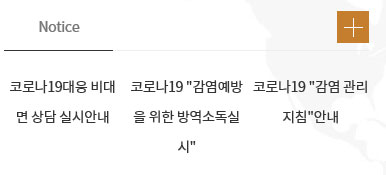
pc화면에서는 위와 같이 가로로 리스팅되구요.
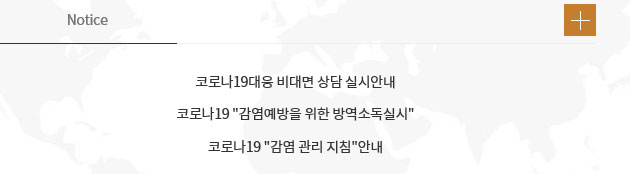
작은 화면으로 가면 이렇게 아래로 정상적으로 리스팅이 되고 있어요.
답변에 대한 댓글 1개
2020-09-13 (일) 00:15:34
ul li 가 width 32프로로 돼 있네요 float left 구요
그 부분 때문에 그런것 같고
작은 화면일 때는 화면 크기별 css 내용이 다르지 싶네요
나열되는 내용들도 li인데 영향을 받지 않나 생각됩니다
그 부분 때문에 그런것 같고
작은 화면일 때는 화면 크기별 css 내용이 다르지 싶네요
나열되는 내용들도 li인데 영향을 받지 않나 생각됩니다
2020-09-12 (토) 23:40:22
상태가 어떤가요? 캡쳐라도 있어야
뭔가 말씀이라도 드리겠네요
답변에 대한 댓글 1개
2020-09-12 (토) 23:59:29
먼저, 블랑숑님! 늦은시간에 답변주셔서 너무 감사드립니다!!!
댓글로는 이미지 첨부가 안돼서 답변작성으로 글 다시 올렸는데,
확인부탁드립니다^^
댓글로는 이미지 첨부가 안돼서 답변작성으로 글 다시 올렸는데,
확인부탁드립니다^^
답변을 작성하려면 로그인이 필요합니다.
늦은 시간까지 답변주셔서 너무 너무 감사드리구요.
블랑숑님 하시는 작업, 일... 모든것 잘 되시길~ 바랍니다.
다시 한번 감사드려요!!!