

안녕하세요
그누보드 글쓰기시
에디터가 기본 9pt로 되어있는데요
너무 작아서 11pt로 기본지정 하고 싶은데
따로 지정할수있는곳이 없더라고요
plugin/editor/ 쪽을 아무리 뒤져보고 만저봐도
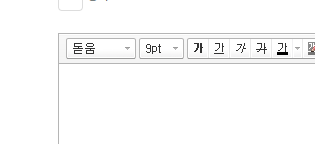
이 부분이 11pt로 변경이 안됩니다.
알고계신 고수님들 도움부탁드립니다. ㅠㅠ
답변 4개 / 댓글 2개
/plugin/editor/smarteditor2/js/smarteditor2.js
스마트에디터2의 모든 설정과 조정은 이곳에서 이루어 집니다.
if(oCurrentStyle){ 여기에서 폰트 사이즈가 조정되는것 같습니다.
/plugin/editor/smarteditor2/css/ko_KR/smart_editor2_in.css
body, .se2_inputarea { margin: 0; padding: 0; font-family: '나눔고딕',Dotum,Helvetica,Sans-serif; font-size: 14.5px; line-height: 1.5; }
font-size: 16px;, 또는 font-size: 14.5px; 이런식으로 변경 하세요...
if(oCurrentStyle){ 이곳에서 폰트사이트가 px에서 pt 변환되는것 같습니다...
plugin/editor/smarteditor2/css/smart_editor2_in.css
plugin/editor/smarteditor2/css/ko_KR/smart_editor2_in.css
plugin/editor/smarteditor2/css/${locale}/smart_editor2_in.css
/*

body,.se2_inputarea{margin:0;padding:0;font-family:'돋움',Dotum,Helvetica,Sans-serif;font-size:12px;line-height:1.5}

*/

body,.se2_inputarea{margin:0;padding:0;font-family:'돋움',Dotum,Helvetica,Sans-serif;font-size:11pt;line-height:1.5}답변에 대한 댓글 2개
plugin/editor/smarteditor2/css/ko_KR/smart_editor2_in.css
body,.se2_inputarea{margin:0;padding:0;font-family:'돋움',Dotum,Helvetica,Sans-serif;font-size:12px;line-height:1.5}
12px로 되어 있는걸 아래처럼
body,.se2_inputarea{margin:0;padding:0;font-family:'돋움',Dotum,Helvetica,Sans-serif;font-size:14.5px;line-height:1.5}
변경하시면 됩니다.
답변을 작성하려면 로그인이 필요합니다.
똑같이 따라해도 여전히 9pt로 나오네요
최신버전 그누보드이며
기본게시판스킨 사용중입니다.