


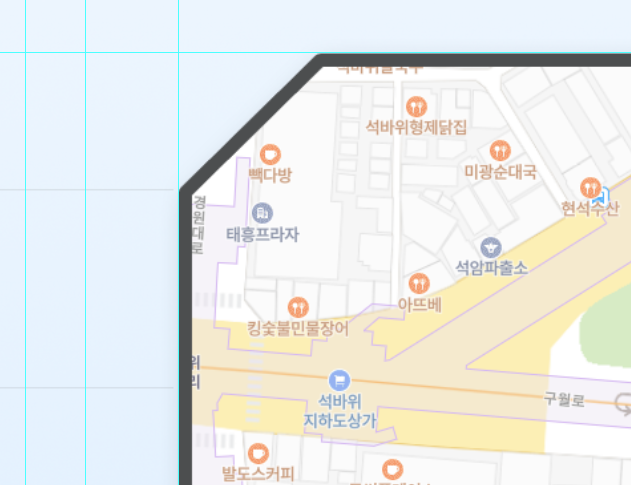
안녕하세요, border-radius 속성으로 한쪽 모서리가 들어간 디자인을 하려고하는데 이걸 어떻게 하는건지 잘 모르겠습니다...ㅠㅠ 알고 계시는 고수님들 계실까요?
|
답변 5개 / 댓글 3개
채택된 답변
+20 포인트
2024-01-11 (목) 18:51:46
다음 코드가 도움이 될지 모르겠습니다.
Copy
<style>
:root {
    --v-shape-00-tp: 25%;
    --v-shape-00-ratio: 0.5;
    --v-shape-00-width: 300px;
    --v-shape-00-height: calc(var(--v-shape-00-width) * var(--v-shape-00-ratio));
    --v-shape-00-border: 5px;
    --v-shape-00-bgcolor: #fff;
}
.tmpl_wrapper {
    background-color: var(--v-shape-00-bgcolor);
}
.tmpl_shape_00, .tmpl_shape_00 > div {
    position: relative;
    width: var(--v-shape-00-width);
    height: var(--v-shape-00-height);
    background-color: #555;
    clip-path: polygon(calc(
        var(--v-shape-00-tp) * var(--v-shape-00-ratio)
    ) 0%, 100% 0%, 100% 100%, 0% 100%, 0% var(--v-shape-00-tp));
}
.tmpl_shape_00 > div {
    position: absolute;
    top: var(--v-shape-00-border);
    left: var(--v-shape-00-border);
    content: '';
    background-color: var(--v-shape-00-bgcolor);
    width: calc(var(--v-shape-00-width) - var(--v-shape-00-border) * 2);
    height: calc(var(--v-shape-00-height) - var(--v-shape-00-border) * 2);
}
</style>


<div class="tmpl_wrapper">
    <div class="tmpl_shape_00">
        <div>this is a text</div>
    </div>
</div>
답변에 대한 댓글 2개
sinbi
2024-01-11 (목) 19:14:06
2024-01-11 (목) 12:22:36
아 그렇군요~
eyekiss 님의 답변을 참고하셔야 겠어요~ㅎㅎ
@제이엔님의 말씀에 한마디 덧붙이면
border-radius:25px 0 0 0 은 상,우,하,좌 입니다.
eyekiss
2024-01-11 (목) 12:06:18
https://studyhardgogo.tistory.com/168
구글에 검색했습니다.
2024-01-11 (목) 12:05:19
안녕하세요.
아래의 내용을 참고해 보시겠어요~
<!DOCTYPE html>
<html>
<head>
<style>
.box {
width: 200px;
height: 200px;
background-color: #f00;
border-radius: 25px 0 0 0;
}
</style>
</head>
<body>
<div class="box"></div>
</body>
</html>
답변에 대한 댓글 1개
2024-01-11 (목) 12:15:59
해보니 radius로는 둥글어지기만 하네요...ㅠㅠㅠ 둥글게 하는게 아니고 샤프하게 모서리를 자른 느낌을 원하고있습니다...!
답변을 작성하려면 로그인이 필요합니다.
질문자 님께 확실히 도움되겠네요. ㅎ