


챗gpt와 3일째 해결을 못하고 있어 글 남깁니다 ㅠ.ㅠ

파란색 형광펜 친 곳에 원래 ㅇ ㅇ ㅇ 이렇게 swiper-pagination이 생깁니다
왼쪽 버튼을 누르면 각 순서에 맞는 사진이 뜨고 (여기까지는 현재 됩니다)
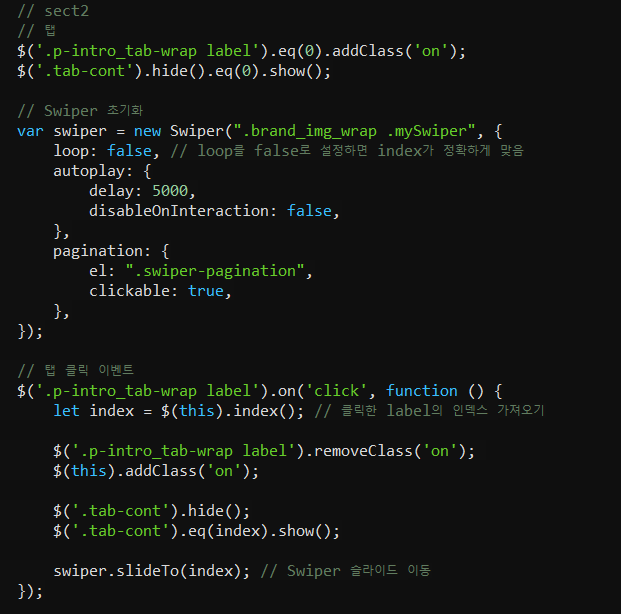
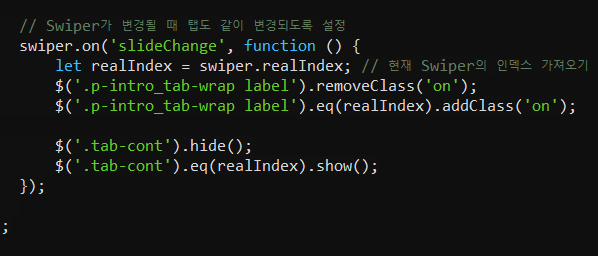
자동으로 swiper가 되는 기능을 구현하고 싶습니다
자동으로 슬라이드가 되면서 label도 각 사진에 맞는 label에 on 효과를 주고 싶습니다 (글자 파란색 + 밑줄 파란색)
html, css, js, 홈페이지 url 주소 남깁니다
도와주세요 ㅠㅠ
[html]

[css]

[js]
답변 1개 / 댓글 2개
채택된 답변
+20 포인트

쳇gpt 친구를 다독였습니다.
*HTML
Copy
<!DOCTYPE html>
<html lang="ko">
<head>
<meta charset="UTF-8">
<title>Brand Story</title>
<!-- Swiper CSS (필요 시 CDN 사용) -->
<link rel="stylesheet" href="https://unpkg.com/swiper/swiper-bundle.min.css" />
<!-- 프로젝트용 CSS -->
<link rel="stylesheet" href="style.css">
</head>
<body>
<!-- 섹션 1 : 브랜드 소개 -->
<section class="section1">
<div class="brand_wrap">
<div class="brand_left_wrap">
<!-- 왼쪽 영역 (이미지나 추가 텍스트) -->
</div>
<div class="main_text_wrap">
<h1>Brand Story</h1>
<p>
인체 양막 유래 줄기세포 배양액 기술로<br>
혁신적인 피부 & 헤어 케어 솔루션입니다.
</p>
<!-- 필요 시 버튼, 링크, 기타 정보 등 추가 -->
</div>
</div>
</section>
<!-- 섹션 2 : 탭 및 슬라이드 영역 -->
<section class="section2">
<div class="p-intro_wrap">
<div class="p-intro_tab-wrap">
<!-- 실제로는 input[type="radio"]를 숨기고 label만으로 탭 UI를 구성할 수도 있음 -->
<label for="tab1">한국어 카테지션</label>
<label for="tab2">엑소좀 (Exosome)</label>
<label for="tab3">한국 제품 특징</label>
</div>
<a href="#">
<span class="detail_btn">자세히 보기</span>
</a>
</div>
<!-- Swiper 슬라이드 영역 -->
<div class="brand_img_wrap mySwiper">
<div class="swiper-wrapper">
<div class="tab-cont swiper-slide">
<img src="images/brand_img_01.png" alt="브랜드 이미지 1">
</div>
<div class="tab-cont swiper-slide">
<img src="images/brand_img_02.png" alt="브랜드 이미지 2">
</div>
<div class="tab-cont swiper-slide">
<img src="images/brand_img_03.png" alt="브랜드 이미지 3">
</div>
</div>
<!-- Swiper 페이지네이션 -->
<div class="swiper-pagination"></div>
</div>
</section>
<!-- jQuery & Swiper JS (필요 시 CDN 사용) -->
<script src="https://code.jquery.com/jquery-3.6.0.min.js"></script>
<script src="https://unpkg.com/swiper/swiper-bundle.min.js"></script>
<!-- 프로젝트용 JS -->
<script src="script.js"></script>
</body>
</html>*style.css
Copy
/* 공통 초기화 (선택사항)
* {
  margin: 0;
  padding: 0;
  box-sizing: border-box;
}
*/

/* =============================
   섹션 1 : 브랜드 소개 스타일
   ============================= */
.section1 .brand_wrap {
  display: flex;
  /* 원하는 레이아웃 설정 */
}
.section1 .brand_left_wrap {
  width: 40%;
  /* 왼쪽 영역에 이미지나 텍스트 추가 시 */
}
.section1 .main_text_wrap {
  width: 60%;
  padding: 40px;
  box-sizing: border-box;
}
.section1 h1 {
  font-size: 2rem;
  margin-bottom: 20px;
}

/* =============================
   섹션 2 : 탭 & 슬라이드 영역
   ============================= */
/* 탭 영역 */
.p-intro_wrap {
  display: flex;
  align-items: center;
  justify-content: space-between;
  margin: 40px 0;
}
.p-intro_tab-wrap {
  display: flex;
  gap: 20px; /* 탭 간격 */
}
.p-intro_tab-wrap label {
  cursor: pointer;
  padding: 5px 10px;
  color: #666;
  border-bottom: 2px solid transparent;
  transition: 0.3s;
}
.p-intro_tab-wrap label.on {
  /* 활성 탭 상태: 파란색 글자 + 파란색 밑줄 */
  color: #2196f3;
  border-color: #2196f3;
}

/* 자세히 보기 버튼 */
.detail_btn {
  display: inline-block;
  background: #333;
  color: #fff;
  padding: 10px 20px;
  border-radius: 4px;
  text-decoration: none;
  transition: 0.3s;
}
.detail_btn:hover {
  background: #666;
}

/* 슬라이드 영역 */
.brand_img_wrap {
  position: relative;
  /* 필요 시 크기 지정: width, height 등 */
}
.tab-cont {
  display: none; /* 초기엔 숨김 */
}
/* Swiper가 슬라이드를 제어할 때 display 사용하므로, 아래처럼 스타일 */
.swiper-slide {
  display: flex;
  justify-content: center;
  align-items: center;
  /* 필요 시 높이, 너비 지정 */
}
.swiper-slide img {
  width: 100%;
  height: auto;
  display: block;
}

/* Swiper 페이지네이션 불릿 (ㅇ ㅇ ㅇ) */
.swiper-pagination {
  position: absolute;
  bottom: 10px; /* 위치 조정 */
  left: 50%;
  transform: translateX(-50%);
}
.swiper-pagination-bullet {
  background: #ccc;
  opacity: 0.7;
  margin: 0 4px; /* 불릿 간격 */
  transition: opacity 0.3s;
}
.swiper-pagination-bullet-active {
  background: #2196f3; /* 활성화된 불릿 색상 */
  opacity: 1;
}

/* ============================================
   (선택) brand_story_page-1__point.png 사용 시
   ============================================ */
/*
.swiper-pagination-bullet {
  width: 16px;
  height: 16px;
  background: url('images/brand_story_page-1__point.png') no-repeat center/cover;
  opacity: 0.5;
  margin: 0 4px;
  transition: opacity 0.3s;
}
.swiper-pagination-bullet-active {
  opacity: 1;
}
*/
*script.js
Copy
$(document).ready(function () {
  // 초기 상태: 첫 번째 탭 활성화
  $('.p-intro_tab-wrap label').eq(0).addClass('on');
  $('.tab-cont').hide().eq(0).show();

  // Swiper 초기화
  var swiper = new Swiper('.brand_img_wrap.mySwiper', {
    loop: false, // loop:true 시 인덱스 주의 (this.realIndex)
    autoplay: {
      delay: 3000,              // 자동 슬라이드 간격 (ms)
      disableOnInteraction: false // 사용자 조작 후에도 자동슬라이드 유지
    },
    pagination: {
      el: '.swiper-pagination',
      clickable: true
      // (선택) renderBullet 등으로 커스텀 가능
    },
    on: {
      slideChange: function () {
        // 현재 활성 슬라이드 인덱스 (0부터 시작)
        let idx = this.activeIndex;
        // 탭 on 클래스 갱신
        $('.p-intro_tab-wrap label').removeClass('on');
        $('.p-intro_tab-wrap label').eq(idx).addClass('on');
        // 해당 인덱스의 콘텐츠만 보이도록 처리
        $('.tab-cont').hide().eq(idx).show();
      }
    }
  });

  // 탭(label) 클릭 이벤트
  $('.p-intro_tab-wrap label').on('click', function () {
    let index = $(this).index();
    // 모든 탭에서 on 제거 후, 현재 탭에 on
    $('.p-intro_tab-wrap label').removeClass('on');
    $(this).addClass('on');

    // 해당 탭 인덱스에 맞는 콘텐츠만 표시
    $('.tab-cont').hide().eq(index).show();

    // Swiper 슬라이드 이동
    swiper.slideTo(index);
  });
});답변을 작성하려면 로그인이 필요합니다.