

포인트 연동 출석확인 게임

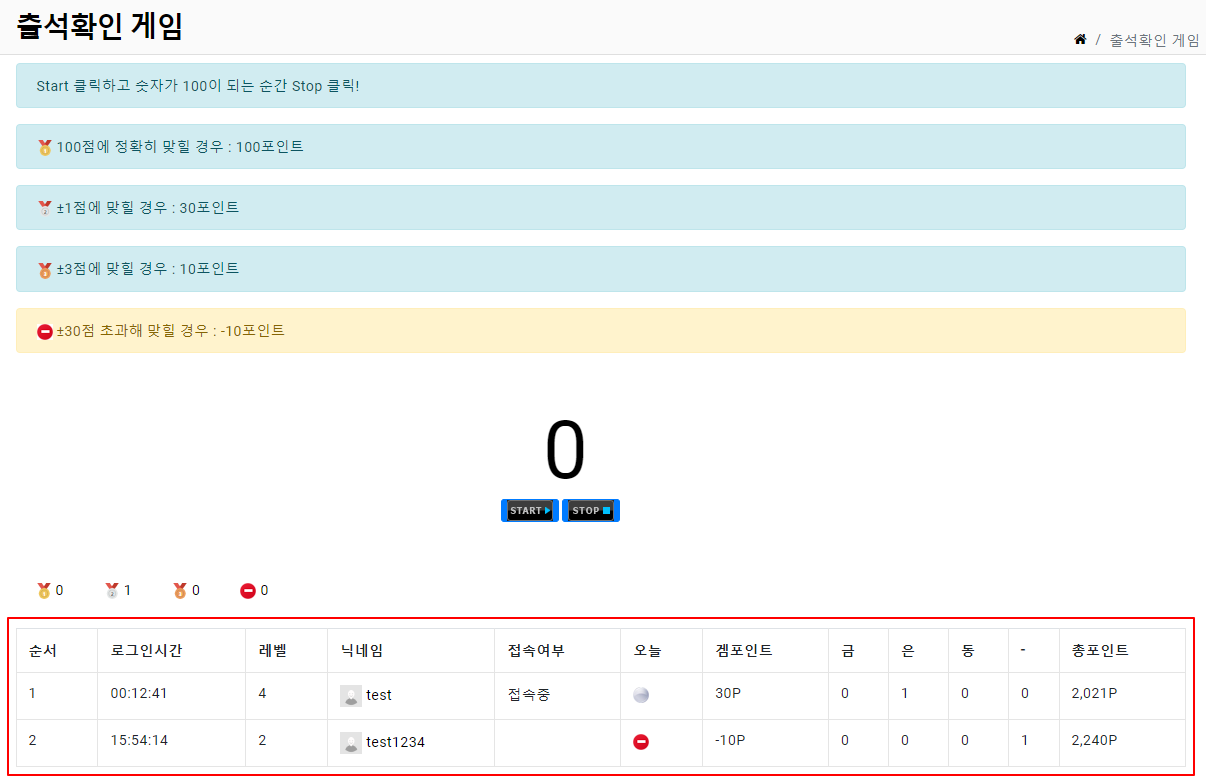
그누보드5에서 할 수 있는 포인트 연동 출석확인 게임입니다.
@TopSchooL 님이 그누보드4용으로 만든 2009년산을 그누보드5용으로 조금 코드 수정했습니다.
원본 : https://sir.kr/g4_skin/84677
그누보드5가 설치된 아무 곳에 폴더 만들고 올리면 됩니다.(경로 수정 필요)
웹학교에 올려 테스트했습니다. (/game/attendance)
웹학교에 올린 곳과 동일하게 하면 별도 코드 수정 필요없습니다.
적용방법
1. 다운로드후 압축을 풀고 서버에 올립니다.
2. 이용하면 됩니다. (별도의 db 설치가 없습니다.)
그누보드 스킨, 플러그인에서 제공되는 게임들을 확인하고 즐기고 싶을 때
웹학교 게임을 방문하여 즐기세요.(^-^)
** 화면은 웹학교환경을 따르다 보니 bootstrap코딩이 되어 있습니다. 디자인을 고치고 싶을 때는 index.php파일을 열고 css수정해 주면 됩니다.
** 하단에 출석회원 목록이 보이는데 이 부분을 삭제 또는 숨기고 싶을 때는
index.php 파일을 열고 136라인부터 188라인까지 주석처리하거나 삭제하면 됩니다.
그럼 아래와 같이 본인 출석하고 본인 결과만 늘 확인할 수 있습니다.

버전 정보
테스트한 버전
5.5
호환 가능 버전
5.3 이상
첨부파일
|
댓글 작성
댓글을 작성하시려면 로그인이 필요합니다.
로그인하기


![회원삭제 [db에서 삭제] 플러그인](/data/file/g5_plugin/thumb-3530634215_uz4Cj5mx_e80947119e6c32446dbc1de8d6dbc377a5ac16b4_600x600.png)




댓글 19개
[code]
<?php
include_once("./_common.php");
$g5['title'] = "출석확인 게임";
include_once(G5_PATH.'/_head.php');
$game_point = 10; // 게임포인트 설정
$game_besu1 = 10; // 퍼펙트 게임포인트 배수 설정
$game_besu2 = 3; // ±1 게임포인트 배수 설정
$game_besu3 = 1; // ±3 게임포인트 배수 설정
$game_range1 = 1; // ±1 게임 점수 설정
$game_range2 = 3; // ±3 게임 점수 설정
$game_minus = 30; // ±30 게임 감점점수 설정
// 게임 평균
function mb_average($mb_id,$agelevel)
{
global $g5;
$sql = "select count(po_id) as cnt from `{$g5['point_table']}` where mb_id='$mb_id' and po_rel_table = '@attendance' and SUBSTRING(po_rel_action,1,1) = '$agelevel' ";
$row = sql_fetch($sql);
$game_average = $row['cnt'];
return $game_average;
}
//로그인 테이블기준 로그인 여부 체크
function mb_loginchk($mb_id)
{
global $g5;
if ($mb_id) {
$sql = "select mb_id from `{$g5['login_table']}` where mb_id='$mb_id' ";
$mb = sql_fetch($sql);
if($mb['mb_id'])
$message = "접속중";
else
$message = "";
return $message;
}
}
// 게임점수
function mb_gamechk($mb_id)
{
global $g5;
$tmp = array();
if ($mb_id) {
$sql = "select po_point, SUBSTRING(po_rel_action,1,1) as agelevel from `{$g5['point_table']}` where mb_id='$mb_id' and SUBSTRING(po_datetime,1,10) = '".G5_TIME_YMD."' and po_rel_table = '@attendance' ";
$po = sql_fetch($sql);
if($po['po_point'])
$tmp['point'] = $po['po_point'];
else
$tmp['point'] = "";
if($po['agelevel'])
$tmp['agelevel'] = $po['agelevel'];
else
$tmp['agelevel'] = "";
return $tmp;
}
}
// 총 인원 수
$sql = " select count(*) as cnt from '{$g5['member_table']}' where mb_today_login like '".G5_TIME_YMD."%' and mb_id != '{$config['cf_admin']}' order by mb_today_login";
$total = sql_fetch($sql);
?>
<script src="<?php echo G5_JS_URL;?>/sideview.js"></script>
<script LANGUAGE="JavaScript">
function Title() {document.title="STOP ON 1o0 By Nolan Gendron"; window.setTimeout("Title1();",1);}
function Title1() {document.title="STOP ON 10o By Nolan Gendron"; window.setTimeout("Title();",1);}
counter=0;
function Counter1() {
window.status="Counter: " + counter;
document.game.number.value=counter;
counter++;
Time=window.setTimeout("Counter1();",1);
if (counter==201) {
counter=0;
}
}
function Results() {
window.clearTimeout(Time);
document.game.number.value=counter;
document.game.submit();
}
</script>
<style type="text/css">
<!--
#attendance_font td{
color: #FFFFFF;
}
.tt1 { font-family: verdana,돋음; font-size: 10px; color: #555555; line-height: 170%; }
.test11 { background-color:#222222; border:0px;width:50px;font-size:24px;text-align:center }
-->
</style>
<table align=center cellpadding="0" cellspacing="0" width="100%">
<tr>
<td height=30 align=right valign=bottom>Total <strong><?php echo $cnt[cnt]?></strong> 명 </td>
</tr>
<tr>
<td height=5 align=right valign=bottom></td>
</tr>
</table>
<table width="720" border="0" align="center" cellpadding="0" cellspacing="0" background="./img/att_base.png" class="tt1">
<tr>
<td width="160" height="170"></td>
<td width="270">
<span class="tt1"><br>
Start 클릭하고 숫자가 100이 되는 순간 Stop 클릭!<br>
[1] 100점에 정확히 맞힐 경우 : <?php echo number_format($game_point * $game_besu1);?>포인트<br>
[2] ±1점에 맞힐 경우 : <?php echo number_format($game_point * $game_besu2);?>포인트<br>
[3] ±3점에 맞힐 경우 : <?php echo number_format($game_point * $game_besu3);?>포인트<br>
(감점 : ±30점 초과해 맞힐 경우 : -<?php echo number_format($game_point * $game_besu3);?>포인트)</span></td>
<td width="95" valign="top">
<form name="game" action="attendance_update.php" method="post">
<table width="100" border="0" cellspacing="0" cellpadding="0">
<tr>
<td height="35"></td>
</tr>
<tr>
<td align="center" height="50">
<input type="hidden" name="point" VALUE="<?php echo $game_point;?>">
<input type="hidden" name="besu1" VALUE="<?php echo $game_besu1;?>">
<input type="hidden" name="besu2" VALUE="<?php echo $game_besu2;?>">
<input type="hidden" name="besu3" VALUE="<?php echo $game_besu3;?>">
<input type="hidden" name="range1" VALUE="<?php echo $game_range1;?>">
<input type="hidden" name="range2" VALUE="<?php echo $game_range2;?>">
<input type="hidden" name="minus" VALUE="<?php echo $game_minus;?>">
<input class="test11" type="text" name="number" VALUE="0" onFocus="this.blur();" style="font-size: 40;font-family:arial black;width:100;color:white">
</td>
</tr>
<tr>
<td height="30" align="center">
<img id="Start" src="./img/_start.png" border=0 onClick="Counter1(); counter=0;" style="cursor:hand;"> <input type=image id="Stop" src="./img/_stop.png" border=0 onClick="Results(); counter=0;">
</td>
</tr>
<tr>
<td height="45"></td>
</tr>
</table>
</form>
</td>
<td width="100" valign="top"><table width="45" border="0" align="right" cellpadding="0" cellspacing="0">
<tr>
<td height="69"> </td>
</tr>
[/code]
<tr>
<td height="20" align="right"><?php echo mb_average($member[mb_id],"a");?></td>
</tr>
<tr>
<td height="20" align="right"><?php echo mb_average($member[mb_id],"b");?></td>
</tr>
<tr>
<td height="20" align="right"><?php echo mb_average($member[mb_id],"c");?></td>
</tr>
<tr>
<td height="20" align="right"><?php echo mb_average($member[mb_id],"e");?></td>
</tr>
</table></td>
<td width="25"></td>
</tr>
</table>
<br />
<table width=100% align=center cellpadding="0" cellspacing="0">
<tr height=25 align=center id="attendance_font">
<td width="40" background="./img/count_bg.gif"><div style="margin-left:5px;">순서</div></td>
<td width="7"><img src="./img/count_bg._shodow.gif" width="7" /></td>
<td width="80" background="./img/board_image_bg.gif">로그인시간</td>
<td width="30" background="./img/board_image_bg.gif">레벨</td>
<td width="100" background="./img/board_image_bg.gif">닉네임</td>
<td width="" background="./img/board_image_bg.gif">접속여부</td>
<td width="30" background="./img/board_image_bg.gif">오늘</td>
<td width="70" background="./img/board_image_bg.gif">겜포인트</td>
<td width="35" background="./img/board_image_bg.gif">금</td>
<td width="35" background="./img/board_image_bg.gif">은</td>
<td width="35" background="./img/board_image_bg.gif">동</td>
<td width="35" background="./img/board_image_bg.gif">-</td>
<td width="9"><img src="./img/point_bg_shodow.gif" alt="" width="9" /></td>
<td width="80" background="./img/point_image.gif">총포인트</td>
</tr>
<tr>
<td height="6" colspan="14" background="./img/board_shodow.gif"></td>
</tr>
<?php
$sql = " select mb_id, mb_name, mb_nick, mb_level, mb_email, mb_homepage, mb_today_login, mb_point
from `{$g5['member_table']}`
where SUBSTRING(mb_today_login,1,10) = '".G5_TIME_YMD."'
and mb_level < '10'
order by mb_today_login ";
$result = sql_query($sql);
for ($i=1; $row=sql_fetch_array($result); $i++)
{
// 자신이라면 체크
if ($row['mb_id'] == $member['mb_id'])
$bgcolor = "#FFFFFF";
$mb_nick = get_sideview($row['mb_id'], $row['mb_nick'], $row['mb_email'], $row['mb_homepage']);
// 본명사용시 사용 $mb_name = get_sideview($row[mb_id], $row[mb_name], $row[mb_email], $row[mb_homepage]);
$mb_loginchk = mb_loginchk($row['mb_id']);
$mb_gamechk = mb_gamechk($row['mb_id']);
?>
<tr bgcolor='<?php echo $bgcolor?>' onmouseout=this.bgColor='<?php echo $bgcolor?>' onmouseover=this.bgColor='#f1f1f1'>
<td align="center" height=25><div style="margin-left:5px;"><?php echo $i?></div></td>
<td width="7"></td>
<td align="center"><?php echo substr($row[mb_today_login],11,8)?></td>
<td align="center"><?php echo $row[mb_level];?></td>
<td align="center"><?php echo $mb_nick ?></td>
<td align="center"><?php echo $mb_loginchk?></td>
<td align="center"><img src="./img/ico_medal_<?php echo $mb_gamechk[agelevel];?>.png"></td>
<td align="right"><div style="margin-right:15px;"><?php echo $mb_gamechk[point]?>P</div></td>
<td align="right"><div style="margin-right:10px;"><?php echo mb_average($row[mb_id],"a");?></div></td>
<td align="right"><div style="margin-right:10px;"><?php echo mb_average($row[mb_id],"b");?></div></td>
<td align="right"><div style="margin-right:10px;"><?php echo mb_average($row[mb_id],"c");?></div></td>
<td align="right"><div style="margin-right:10px;"><?php echo mb_average($row[mb_id],"e");?></div></td>
<td width="9"></td>
<td align="right"><div style="margin-right:15px;"><?php echo number_format($row[mb_point])?>P</div></td>
</tr>
<tr><td colspan=14 height=1 bgcolor='#E0E0E0'></td></tr>
<?php } ?>
</table>
<!-- 목록 나오는 부분{ -->
<?php
include_once(G5_PATH.'/_tail.php');
[/code]
[http://sir.kr/data/editor/2209/70b1a4246c24f4ff585d8cc5f477d287_1663746328_3853.jpg]
보유 포인트가 0일때 스타트버튼이 안눌리게 하려면 어떻게 해야할까요?