


일전에 배포한 그누보드4용 JS빌더에 있던 기능을 그누보드 5.3에 맞추어 수정하였습니다. 사용법은 아래와 같습니다. 다운 받으시고 압축을 해제 하신후 그누보드 PLUGIN...
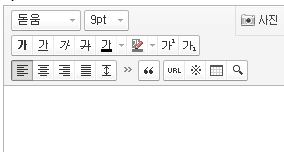
/plugin/editor/smarteditor2/css/ko_KR/smart_editor2.css
아래 소스 추가
#smart_editor2{margin-right:1px !important;min-width:100px !important}
@media screen and (max-width: 640px){
#smart_editor2 .se2_text_tool ul:nth-child(4n){clear:both;}
#smart_editor2 .se2_text_tool ul{margin-bottom:4px}
#smart_editor2 .se2_text_tool ul:nth-child(n+4){margin-bottom:0}
#smart_editor2 .se2_text_tool .se2_multy,#smart_editor2 .se2_text_tool .se2_multy button, #smart_editor2 .se2_text_tool .se2_multy button span{height:54px}
}
@media screen and (max-width: 515px){
#smart_editor2 .se2_text_tool ul:nth-child(3n){clear:both;margin-left:4px}
#smart_editor2 .se2_text_tool ul:nth-child(6n),#smart_editor2 .se2_text_tool ul:nth-child(4n){clear:none;margin-left:0}
#smart_editor2 .se2_text_tool ul:nth-child(n+3){margin-bottom:0}
}
@media screen and (max-width: 370px){
#smart_editor2 .se2_text_tool ul:nth-child(2n){clear:both;margin-left:4px}
#smart_editor2 .se2_text_tool ul:nth-child(3n){clear:both;margin-left:4px}
#smart_editor2 .se2_text_tool ul:nth-child(6n),#smart_editor2 .se2_text_tool ul:nth-child(4n){clear:none;margin-left:0}
#smart_editor2 .se2_text_tool ul:nth-child(n+3){margin-bottom:0}
#smart_editor2 .se2_text_tool .se2_multy,#smart_editor2 .se2_text_tool .se2_multy button, #smart_editor2 .se2_text_tool .se2_multy button span{height:79px}
}
@media screen and (max-width: 325px){
#smart_editor2 .se2_text_tool .se2_multy,#smart_editor2 .se2_text_tool .se2_multy button, #smart_editor2 .se2_text_tool .se2_multy button span{height:29px;}
#smart_editor2 .se2_text_tool .se2_multy{border-bottom:1px solid #e0dedf}
}
그누보드 호환이거나 독립적으로 실행되는 플러그인을 소개합니다.
일전에 배포한 그누보드4용 JS빌더에 있던 기능을 그누보드 5.3에 맞추어 수정하였습니다. 사용법은 아래와 같습니다. 다운 받으시고 압축을 해제 하신후 그누보드 PLUGIN...

여러개의 사이트를 동일한 소스로 관리하실 경우 유용한 소스입니다. 1. 클라이언트 사이트 1) config 테이블에 cf_version 추가 - alter ta...

예전에 카드뉴스가 한창 유행할 때 카드뉴스 만들 폼을 만들어 달라고 의뢰받은 것이 있었는데 소스 일부분이 남아있어서 정해진 크기의 이미지를 crop할 때 사용할 수 있도록 만들어 ...

그누 방문자에 ip가 나옵니다. 이것을 시군까지 찾아서 저장해줍니다. 첨부된 파일의 프러그인을 올립니다. plugin 에는 단순한 몇줄의 코드가 들어 있습니다. 플로그인으로 올...

가끔 관리자용 게시판을 만들어서 쓰는데 관리자페이지에서 벗어나서 사용자 페이지에서 확인을 해야하는 불편함이 있어서 관리자 페이지에서 게시판을 볼수있도록 하면 좋겠다 싶어 급히 ...

코드를 좀 더 정리할 필요가 있을 것 같습니다. 코드 수정하여 유료로 전환합니다. (2021-11-17) 감사합니다. https://sir.kr/cmall/1637045...

좌표값을 입력 받고 싶을 때 사용해 보세요. 관리자로 로그인 했을 때만 우측상당 카카오 키 설정 버튼이 나옵니다.

★★ 머리글 * 오랫만에 무료 프로그램을 올립니다. * 그누보드5.3.X대용입니다. 그누보드5.2.X대에서 화면이 깨질수 있습니다. 5.2.X대나 그누보드4용이나 아미나빌더...

http://good-ideal.kr/plugin/calculator/ 보는바와같이 비트코인계산기입니다.

/plugin/editor/smarteditor2/css/ko_KR/smart_editor2.css 아래 소스 추가 #smart_editor2{margin-right:1px !...

최근에 그누5.3 작업을 하면서 외부유입 검색어 가 필요해서, 기존의 m3stats를 5.3에 맞게 수정해봤습니다. 원 제작자이신 해피정(https://sir.kr/g5_ski...

사이트에 사용되는 항목들을 코드화처리하여 관리의 편리함과 확장성을 염두하였습니다. 다운받으신 파일을 압축을 푸셔서 해당 폴더에 넣으시면 됩니다. 새로 만든파일이라서 기존파일...

댓글 35개
감사합니다.^^
이소스를 어디에 붙여야할까요 맨아래인가요?