


@rido 님이 만드신 코드 https://sir.kr/g5_plugin/3572 가 필요해서
최신 버전에 올려 봤습니다.
몇가지 수정된 것으로 하시면 다음과 같이 나옵니다.
CSS는 @亞波治 사이트 https://www.apachezone.com 을 참조했습니다.
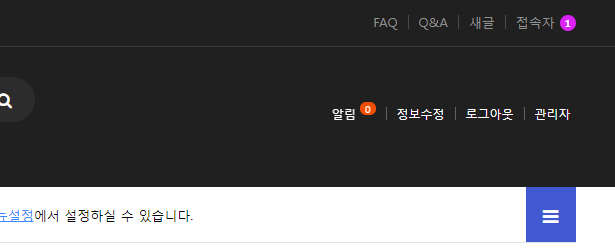
먼저 코드 넣는 위치는
theme/basic/head.php
[code]
<?php if ($is_member) { ?>
<?php include_once(G5_PATH.'/plugin/srd-pushmsg/pushmsg_view.php'); ?>
<li><a href="<?php echo G5_BBS_URL ?>/member_confirm.php?url=<?php echo G5_BBS_URL ?>/register_form.php">정보수정</a></li>
[/code]
시간이 안맞는 문제는
extend/srd.pushmsg.php 에서 result3을 result2로 변경합니다. (내가 쓴글의 시간)
[code]
// 시간을 현재시간이 아닌 글쓴이의 시간으로 대체한다. (v0.2에서 패치)
$msg_wdate = $result2['wr_datetime'];
[/code]
<? 로 되어 있는 곳은 모두 <?php로 변경해 주세요
특히
ajax.list_pushmsg.php에서 36번째 줄
[code]
<a href="javascript:msg_link(`<?php echo $row['msg_link']?>`,'<?php echo $row['msg_type']?>','<?php echo $row['msg_id']?>');" class="redirect_link">
[/code]
그리고 나머지도..
pushmsg_view.php 에서는 통으로 변경해 주세요.
[code]
$armbg = 'arm0';
$msg_count = $result['cnt'];
?>
<li id="ol_arm"><span style="margin-right:5px">알림 </span><span class="<?php echo $armbg ?>" id="arm_cnt"><?php echo $msg_count?></span><dl></dl> <dl id="dd_arm" style="display: none;">
</li>
[/code]
style.css의 어느 부분이 전체 레이아웃를 깨드립니다. 다 지우고 아래것으로 만 쓰세요
[code]
/* 서비스알림 /bbs/pushmsg.php */
.sir_armv #wrapper_title {position:relative;margin:0 0 15px;color:#4d4840;font-size:1.14em;font-weight:bold;display:block}
.sir_armv p{margin:0;padding: 0 0 10px;line-height:1.8em;word-break:break-all}
#sir_armv {zoom:1}
#sir_armv:after {display:block;visibility:hidden;content:"";clear:both;width:100%;height:0;overflow:hidden}
#sir_armv ul {clear:both;margin:0 0 10px;padding:0;border-top:1px solid #e9e9e9;list-style:none}
#sir_armv li {position:relative;border-bottom:1px solid #e9e9e9}
#sir_armv li a:hover{text-decoration:none}
#sir_armv .list_time {display:inline-block;margin:0 0 0 10px;width:80px}
#sir_armv .list_stat {display:inline-block;width:60px;color:#ff3061}
#sir_armv .list_read .list_stat {color:#5ba5d0; }
#sir_armv .list_link {display:inline-block;padding:12px 0;}
#sir_armv .list_tit{display:inline-block;text-overflow: ellipsis; overflow: hidden; white-space: nowrap; width:500px}
#sir_armv .list_del {position:absolute;top:9px;right:0;padding:3px;background:#ff4f91}
#sir_armv em {color:#ff3061;font-style:normal}
#sir_armv #list_empty {padding:100px 0}
#sir_armv .sir_bw02 {float:left;margin:0 0 10px}
#sir_armv .sir_bw03 {float:right;margin:0 0 10px}
#sir_armv .sir_b01_adm{ display:inline-block;padding:0 10px;height:25px;border:0;background:#5f6467 !important;color:#fff !important;vertical-align:middle;text-align:center;line-height:2.2em;font-size:1em}
#sir_armv .sir_bw02 button, #sir_armv .sir_bw03 button, #sir_armv .sir_bw02 input[type=submit]{border-top:0;cursor:pointer;line-height:0;vertical-align:middle}
#sir_armv .sir_b01{display:inline-block;padding:0 9px;height:25px;border:0;background:#89bcc1 !important;color:#fff !important;vertical-align:middle;text-align:center;line-height:2.2em}
li#ol_arm{border-left:0;}
#ol_arm {z-index:10001;position:relative;cursor:pointer;color:#fff;}
#ol_arm #arm_cnt {color:#fff;vertical-align:top}
#ol_arm #arm_cnt.arm1 {font-weight:bold}
#ol_arm #arm_cnt.arm0{position: relative;display:inline-block;line-height:13px;margin-left:-5px;padding:0 5px;border-radius:10px;font-size:10px;right:0;top:-5px;background: #f04e00;color: #fff;}
#ol_arm dl {display:none;z-index:100;position:absolute;top:30px;left:0;margin:0;padding:0;width:198px;border:1px solid #818f98;background:#fff;list-style:none;line-height:1.2em}
#ol_arm dd {position:relative;margin:0;border:0;border-bottom:1px solid #d4dbe0;background:#fff;}
#ol_arm dd a.redirect_link {display:block;padding:5px 20px 5px 5px;background:#fff;color:#69797c;letter-spacing:-0.1em; height:50px; line-height:14px}
#ol_arm dd a.redirect_link:focus, #hd #hd_wrapper #tnb #ol_arm dd a:hover {background:#d9e1e5;color:#000}
#ol_arm .arm_time {display:block;margin:3px 0 0;color:#999}
#ol_arm dd .arm_del {display:inline-block;position:absolute;top:5px;right:5px;padding:0;width:auto;background:#ff4f91; height:15px}
#ol_arm dd .arm_del img {display:inline-block;position:relative;top:-7px;left:1px}
#ol_arm #arm_all a {display:block;padding:7px 0;background:#fff;color:#69797c;letter-spacing:-0.1em;text-align:center;margin:0;}
#ol_arm #arm_empty {padding:20px 0;width:100%;text-align:center}
[/code]
현재까지 발견한 문제(?)는 다음과 같습니다. 편의상 thisgun 님 코드와 비교했습니다.
같은 글에 두명의 댓글이 달린 경우입니다.
알림이 한개만 오지만, 이것은 2개가 오는데, 같은 글이기 때문에 첫번째 알림을 클릭을 하면 갯수가 바로 줄지만, 2번째 클릭을 하게 되면 숫자가 바로 줄지는 않습니다.
그렇지만 이미 알림은 읽은 것으로 됩니다.

댓글 10개
본문과 조금 틀리지만 파일 압축해서 아래 링크에 올려 두었습니다.
https://apachezone.com/gnu5/102
테스트 해봐야 겠습니다. 감사합니다.