

부트스트랩 Modal Autoload
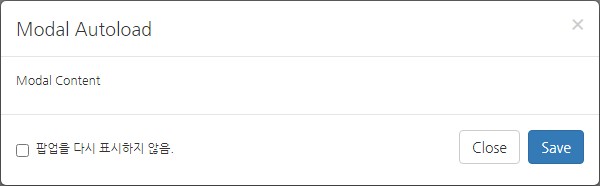
사용방법
부트스트랩 모달팝업에 data-autoload="true" data-autoload-delay="2000" 추가
data-autoload : 사용여부
data-autoload-delay : 모달팝업 지연
[첨부파일 참조]
HTML
[code]
<div id="Modal_Autoload" class="modal fade" data-autoload="true" data-autoload-delay="2000">
<div class="modal-dialog">
<div class="modal-content">
<div class="modal-header">
<button type="button" class="close" data-dismiss="modal" aria-label="Close"><span aria-hidden="true">×</span></button>
<h4 class="modal-title">Modal Autoload</h4>
</div>
<div class="modal-body">
<p>Modal Content</p>
</div>
<div class="modal-footer">
<div class="checkbox pull-left">
<label>
<input class="loadModalHide" type="checkbox" value=""> 팝업을 다시 표시하지 않음.
</label>
</div>
<button type="button" class="btn btn-default" data-dismiss="modal">Close</button>
<button type="button" class="btn btn-primary">Save</button>
</div>
</div>
</div>
</div>
[/code]
JS
[code]
jQuery(window).ready(function () {
/** Modal Autoload
**************************************************************** **/
if(jQuery("div.modal").length > 0) {
jQuery("div.modal").each(function() {
var _t = jQuery(this),
_id = _t.attr('id'),
_autostart = _t.attr('data-autoload') || false;
// reset allow
// localStorage.removeItem(_id);
if(_id != '') { // rewrite if set to hidden by the user
if(localStorage.getItem(_id) == 'hidden') {
_autostart = 'false';
}
}
if(_autostart == 'true') {
jQuery(window).on("load", function() { // required on load!
var _delay = _t.attr('data-autoload-delay') || 1000; // delay when modal apprear
setTimeout(
function() {
_t.modal('toggle');
}, parseInt(_delay));
});
}
// LOCAL STORAGE - DO NOT HIDE ON NEXT PAGE LOAD!
jQuery("input.loadModalHide", this).bind("click", function() {
var _tt = jQuery(this);
if(_tt.is(":checked")) {
localStorage.setItem(_id, 'hidden');
console.log('[Modal Autoload #'+_id+'] Added to localStorage');
} else {
localStorage.removeItem(_id);
console.log('[Modal Autoload #'+_id+'] Removed from localStorage');
}
});
});
}
});
[/code]
댓글 5개