

Company 테마 Mobile 메인 슬라이딩 이미지 수정 예
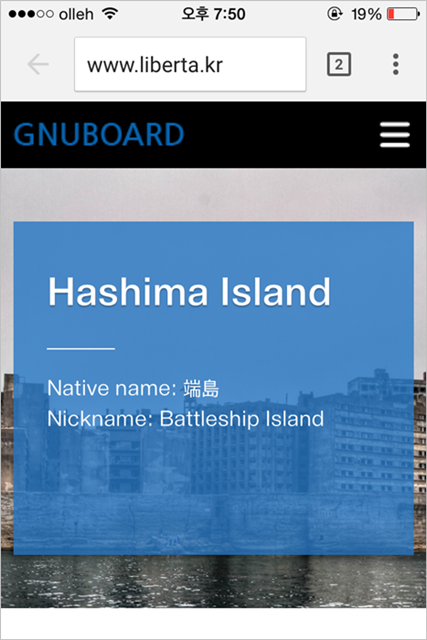
{이미지:0}
theme/company/css/mobile.css
[code].swiper-slide {background:url(../img/main_bn.jpg) no-repeat 50% 50%;background-size: cover;height:330px;[/code]
를...
[code].swiper-slide {background-position: center;background-size: cover;height: 330px;[/code]
로 수정합니다.
수정하지 않고 그냥 둬도 슬라이드에 영향을 끼치지는 않네요. 뭐지~~ ( ")
theme/company/mobile/index.php
[code]<div class="swiper-container">
<div class="swiper-wrapper">
<div class="swiper-slide" style="background-image:url(http://liberta1980.co-story.net/theme/company/img/Hashima_Island_01.jpg)">
<div class="bn_txt">
<h2>Hashima Island <br></h2>
<p>Native name: 端島<br>Nickname: Battleship Island</p>
</div>
</div>
<div class="swiper-slide" style="background-image:url(http://liberta1980.co-story.net/theme/company/img/Hashima_Island_02.jpg)">
<div class="bn_txt">
<h2>Hashima Island <br></h2>
<p>Native name: 端島<br>Nickname: Battleship Island</p>
</div>
</div>
<div class="swiper-slide" style="background-image:url(http://liberta1980.co-story.net/theme/company/img/Hashima_Island_03.jpg)">
<div class="bn_txt">
<h2>Hashima Island <br></h2>
<p>Native name: 端島<br>Nickname: Battleship Island</p>
</div>
</div>
<div class="swiper-slide" style="background-image:url(http://liberta1980.co-story.net/theme/company/img/Hashima_Island_04.jpg)">
<div class="bn_txt">
<h2>Hashima Island <br></h2>
<p>Native name: 端島<br>Nickname: Battleship Island</p>
</div>
</div>
</div>
<!-- Add Pagination -->
<div class="swiper-pagination"></div>
</div>[/code]
이렇게 백그라운드 이미지 경로를 스타일로 입력해줍니다.
PC 메인 수정 때는 class에 연번을 줬습니다만, 여기서는 손대지 않습니다.
이미지를 자동으로 슬라이딩 시키려면...
theme/company/mobile/index.php
[code]<script>
var swiper = new Swiper('.swiper-container', {
pagination: '.swiper-pagination',
paginationClickable: true
});
</script>[/code]
를
[code]<script>
var mySwiper = new Swiper('.swiper-container',{
pagination: '.pagination',
paginationClickable: true,
speed: 1000,
autoplay: 5000,
loop: true,
autoResize: true
})
$('.arrow-left').on('click', function(e){
e.preventDefault()
mySwiper.swipePrev()
})
$('.arrow-right').on('click', function(e){
e.preventDefault()
mySwiper.swipeNext()
})
</script>[/code]
로 수정합니다.
더 자세한 옵션은 아래 주소를 참고하세요.
http://www.idangero.us/swiper/api/#.VkMTxLfhCUk
theme/company/css/mobile.css
[code].swiper-slide {background:url(../img/main_bn.jpg) no-repeat 50% 50%;background-size: cover;height:330px;[/code]
를...
[code].swiper-slide {background-position: center;background-size: cover;height: 330px;[/code]
로 수정합니다.
수정하지 않고 그냥 둬도 슬라이드에 영향을 끼치지는 않네요. 뭐지~~ ( ")
theme/company/mobile/index.php
[code]<div class="swiper-container">
<div class="swiper-wrapper">
<div class="swiper-slide" style="background-image:url(http://liberta1980.co-story.net/theme/company/img/Hashima_Island_01.jpg)">
<div class="bn_txt">
<h2>Hashima Island <br></h2>
<p>Native name: 端島<br>Nickname: Battleship Island</p>
</div>
</div>
<div class="swiper-slide" style="background-image:url(http://liberta1980.co-story.net/theme/company/img/Hashima_Island_02.jpg)">
<div class="bn_txt">
<h2>Hashima Island <br></h2>
<p>Native name: 端島<br>Nickname: Battleship Island</p>
</div>
</div>
<div class="swiper-slide" style="background-image:url(http://liberta1980.co-story.net/theme/company/img/Hashima_Island_03.jpg)">
<div class="bn_txt">
<h2>Hashima Island <br></h2>
<p>Native name: 端島<br>Nickname: Battleship Island</p>
</div>
</div>
<div class="swiper-slide" style="background-image:url(http://liberta1980.co-story.net/theme/company/img/Hashima_Island_04.jpg)">
<div class="bn_txt">
<h2>Hashima Island <br></h2>
<p>Native name: 端島<br>Nickname: Battleship Island</p>
</div>
</div>
</div>
<!-- Add Pagination -->
<div class="swiper-pagination"></div>
</div>[/code]
이렇게 백그라운드 이미지 경로를 스타일로 입력해줍니다.
PC 메인 수정 때는 class에 연번을 줬습니다만, 여기서는 손대지 않습니다.
이미지를 자동으로 슬라이딩 시키려면...
theme/company/mobile/index.php
[code]<script>
var swiper = new Swiper('.swiper-container', {
pagination: '.swiper-pagination',
paginationClickable: true
});
</script>[/code]
를
[code]<script>
var mySwiper = new Swiper('.swiper-container',{
pagination: '.pagination',
paginationClickable: true,
speed: 1000,
autoplay: 5000,
loop: true,
autoResize: true
})
$('.arrow-left').on('click', function(e){
e.preventDefault()
mySwiper.swipePrev()
})
$('.arrow-right').on('click', function(e){
e.preventDefault()
mySwiper.swipeNext()
})
</script>[/code]
로 수정합니다.
더 자세한 옵션은 아래 주소를 참고하세요.
http://www.idangero.us/swiper/api/#.VkMTxLfhCUk
첨부파일
|
댓글을 작성하시려면 로그인이 필요합니다.
댓글 7개