

전체최신글 스킨에 아이콘 출력
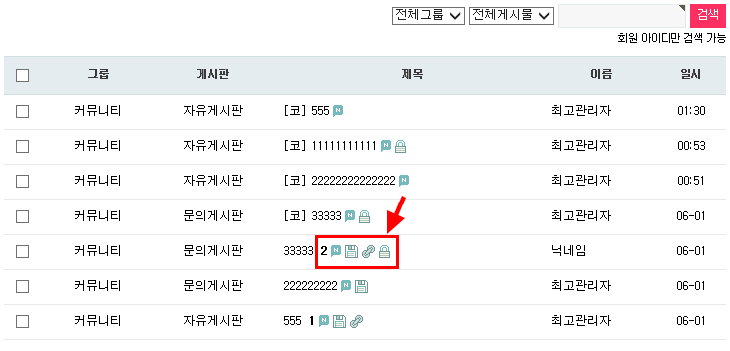
bbs/new.php 파일 스킨에 일반 게시판처럼 각종 아이콘을 출력하는 방법입니다.
1. bbs/new.php 파일 수정
위치 잘 보셔서 추가된 부분만 넣어주세요. 다 넣을 필요는 없으며 필요한 아이콘만 추가해도 됩니다.
if ($row['wr_id'] == $row['wr_parent']) { 여기가 원글이고 else 이후가 코멘트글입니다.
...........................
...........................
// 당일인 경우 시간으로 표시함
$datetime = substr($row3['wr_datetime'],0,10);
$datetime2 = $row3['wr_datetime'];
if ($datetime == G5_TIME_YMD) {
$datetime2 = substr($datetime2,11,5);
} else {
$datetime2 = substr($datetime2,5,5);
}
}
// 아이콘 출력 여기서부터 추가 시작
if ($row['wr_id'] == $row['wr_parent']) {
$list[$i]['comment_cnt'] = '';
if ($row2['wr_comment'])
$list[$i]['comment_cnt'] = "<span class=\"cnt_cmt\">".$list[$i]['wr_comment']."</span>";
$list[$i]['icon_link'] = '';
if ($row2['wr_link1'] || $row2['wr_link2'])
$list[$i]['icon_link'] = '<img src="'.$new_skin_url.'/img/icon_link.gif" alt="관련링크">';
$list[$i]['icon_secret'] = '';
if (strstr($list[$i]['wr_option'], 'secret'))
$list[$i]['icon_secret'] = '<img src="'.$new_skin_url.'/img/icon_secret.gif" alt="비밀글">';
$list[$i]['icon_new'] = '';
if ($row2['wr_datetime'] >= date("Y-m-d H:i:s", G5_SERVER_TIME - (24 * 3600)))
$list[$i]['icon_new'] = '<img src="'.$new_skin_url.'/img/icon_new.gif" alt="새글">';
$list[$i]['file']['count'] = $row2['wr_file'];
if ($list[$i]['file']['count'])
$list[$i]['icon_file'] = '<img src="'.$new_skin_url.'/img/icon_file.gif" alt="첨부파일">';
} else {
$list[$i]['icon_secret'] = '';
if (strstr($list[$i]['wr_option'], 'secret'))
$list[$i]['icon_secret'] = '<img src="'.$new_skin_url.'/img/icon_secret.gif" alt="비밀글">';
$list[$i]['icon_new'] = '';
if ($row3['wr_datetime'] >= date("Y-m-d H:i:s", G5_SERVER_TIME - (24 * 3600)))
$list[$i]['icon_new'] = '<img src="'.$new_skin_url.'/img/icon_new.gif" alt="새글">';
}
// 아이콘 출력 여기까지 추가됨
$list[$i]['gr_id'] = $row['gr_id'];
$list[$i]['bo_table'] = $row['bo_table'];
$list[$i]['name'] = $name;
.........................................
.........................................
2. skin/new/basic/ 폴더에 img 폴더를 새로 생성한 다음
skin/latest/basic/img 폴더에 있는 아이콘 이미지를 복사해서 추가
3. skin/new/basic/new.skin.php 파일에서
<td><a href="<?php echo $list[$i]['href'] ?>"><?php echo $list[$i]['comment'] ?><?php echo $wr_subject ?></a></td>
윗부분을 이렇게 수정
<td>
<a href="<?php echo $list[$i]['href'] ?>"><?php echo $list[$i]['comment'] ?><?php echo $wr_subject ?> <?php if ($list[$i]['comment_cnt']) echo $list[$i]['comment_cnt']; ?></a>
<?php
if (isset($list[$i]['icon_new'])) echo " " . $list[$i]['icon_new'];
if (isset($list[$i]['icon_file'])) echo " " . $list[$i]['icon_file'];
if (isset($list[$i]['icon_link'])) echo " " . $list[$i]['icon_link'];
if (isset($list[$i]['icon_secret'])) echo " " . $list[$i]['icon_secret'];
?>
</td>
수정하기 힘드신 분은 스킨 자료실에 별도로 올려놨습니다.
https://sir.kr/g5_skin/14639
1. bbs/new.php 파일 수정
위치 잘 보셔서 추가된 부분만 넣어주세요. 다 넣을 필요는 없으며 필요한 아이콘만 추가해도 됩니다.
if ($row['wr_id'] == $row['wr_parent']) { 여기가 원글이고 else 이후가 코멘트글입니다.
...........................
...........................
// 당일인 경우 시간으로 표시함
$datetime = substr($row3['wr_datetime'],0,10);
$datetime2 = $row3['wr_datetime'];
if ($datetime == G5_TIME_YMD) {
$datetime2 = substr($datetime2,11,5);
} else {
$datetime2 = substr($datetime2,5,5);
}
}
// 아이콘 출력 여기서부터 추가 시작
if ($row['wr_id'] == $row['wr_parent']) {
$list[$i]['comment_cnt'] = '';
if ($row2['wr_comment'])
$list[$i]['comment_cnt'] = "<span class=\"cnt_cmt\">".$list[$i]['wr_comment']."</span>";
$list[$i]['icon_link'] = '';
if ($row2['wr_link1'] || $row2['wr_link2'])
$list[$i]['icon_link'] = '<img src="'.$new_skin_url.'/img/icon_link.gif" alt="관련링크">';
$list[$i]['icon_secret'] = '';
if (strstr($list[$i]['wr_option'], 'secret'))
$list[$i]['icon_secret'] = '<img src="'.$new_skin_url.'/img/icon_secret.gif" alt="비밀글">';
$list[$i]['icon_new'] = '';
if ($row2['wr_datetime'] >= date("Y-m-d H:i:s", G5_SERVER_TIME - (24 * 3600)))
$list[$i]['icon_new'] = '<img src="'.$new_skin_url.'/img/icon_new.gif" alt="새글">';
$list[$i]['file']['count'] = $row2['wr_file'];
if ($list[$i]['file']['count'])
$list[$i]['icon_file'] = '<img src="'.$new_skin_url.'/img/icon_file.gif" alt="첨부파일">';
} else {
$list[$i]['icon_secret'] = '';
if (strstr($list[$i]['wr_option'], 'secret'))
$list[$i]['icon_secret'] = '<img src="'.$new_skin_url.'/img/icon_secret.gif" alt="비밀글">';
$list[$i]['icon_new'] = '';
if ($row3['wr_datetime'] >= date("Y-m-d H:i:s", G5_SERVER_TIME - (24 * 3600)))
$list[$i]['icon_new'] = '<img src="'.$new_skin_url.'/img/icon_new.gif" alt="새글">';
}
// 아이콘 출력 여기까지 추가됨
$list[$i]['gr_id'] = $row['gr_id'];
$list[$i]['bo_table'] = $row['bo_table'];
$list[$i]['name'] = $name;
.........................................
.........................................
2. skin/new/basic/ 폴더에 img 폴더를 새로 생성한 다음
skin/latest/basic/img 폴더에 있는 아이콘 이미지를 복사해서 추가
3. skin/new/basic/new.skin.php 파일에서
<td><a href="<?php echo $list[$i]['href'] ?>"><?php echo $list[$i]['comment'] ?><?php echo $wr_subject ?></a></td>
윗부분을 이렇게 수정
<td>
<a href="<?php echo $list[$i]['href'] ?>"><?php echo $list[$i]['comment'] ?><?php echo $wr_subject ?> <?php if ($list[$i]['comment_cnt']) echo $list[$i]['comment_cnt']; ?></a>
<?php
if (isset($list[$i]['icon_new'])) echo " " . $list[$i]['icon_new'];
if (isset($list[$i]['icon_file'])) echo " " . $list[$i]['icon_file'];
if (isset($list[$i]['icon_link'])) echo " " . $list[$i]['icon_link'];
if (isset($list[$i]['icon_secret'])) echo " " . $list[$i]['icon_secret'];
?>
</td>
수정하기 힘드신 분은 스킨 자료실에 별도로 올려놨습니다.
https://sir.kr/g5_skin/14639
첨부파일
|
댓글을 작성하시려면 로그인이 필요합니다.
댓글 9개
https://sir.kr/g4_skin/153927