

jQuery Filter - 폼 필터 Form Filter
폼 필터
폼 필터는 형식(text, checkbox, password, radio, file)을 기반으로 하는 폼 요소를 선택할 때 사용하는 필터로 사용법은 필터와 동일하여, 자세한 설명보다는 아래의 표로 대신 합니다.
|
폼 필터 종류 |
선택 폼 |
|
:button |
<input type=”butto” /> |
|
:checkbox |
<input type=”checkbox” /> |
|
:checked |
<input type=”checkbox” checked=”checked” /> |
|
:disabled |
<input type=”text” disabled=”disabled” /> |
|
:enabled |
<input type=”text” enabled=”enabled” /> |
|
:file |
<input type=”file” /> |
|
:focus |
(1.6 이상에서 지원) |
|
:image |
<input type=”image” /> |
|
:input |
<input> 모든 input 요소 |
|
:password |
<input type=”password” /> |
|
:radio |
<input type=”radio” /> |
|
:reset |
<input type=”reset” /> |
|
:selected |
<select><option selected="selected"></option></select> |
|
:submit |
<input type=”submit” /> |
|
:text |
<input type=”text” /> |
|
:hidden |
<input type=”hidden” /> |
| 표 1. [jQuery 폼 필터의 종류] | |
표에서 보듯이 폼 필터 사용은 매우 간단하여 자세한 설명을 생략하고 필터 중 상태를 체크하는 필터에 대해 알아 보도록 하겠습니다.
:checked , :selected
<input type=”checkbox”/>체크박스, 라디오버튼<input type=”radio” />, 셀렉트<select>의 상태를 확인 하여 선택된 상태 요소들의 집합을 선택 반환합니다.
<html xmlns="http://www.w3.org/1999/xhtml">
<head>
    <title>jQuery Selector</title>
    <link href="../Styles/Site.css" rel="stylesheet" type="text/css" />
    <style>
        div,pre { background : #FFF; padding:10px; margin:10px; }
        table { border:1px solid #AAA; }
        td { border:1px solid #AAA; width:25px; height:25px; }
    </style>
    <script src="http://code.jquery.com/jquery-latest.js"></script>
    <script type="text/javascript">
        $(document).ready(function () {
            $(":checked,:selected").css("border", "2px solid red");
            $(":selected").css("background", "red");
        });
    </script>
</head>
<body style="padding:10px;">
    <h2>jQuery 시작 Selector</h2>
    <p>jQuery에 대한 자세한 내용을 보려면 jquery.com 을 방문하세요.</p>
    <div>
        <ul>
            <li><input type="checkbox" checked="checked" />CheckBox #1 - </li>
            <li><input type="checkbox" />CheckBox #2</li>
            <li><input type="checkbox" checked="checked" />CheckBox #3</li>
        </ul>
        <select multiple="multiple">
            <option>Option #1</option>
            <option selected="selected">Option #2</option>
            <option>Option #3</option>
        </select>
    </div>
</body>
</html>
[예제 1. 폼필터의 사용예제]
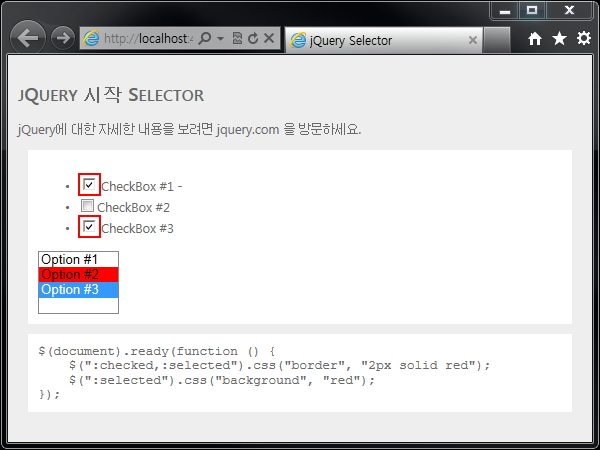
[예제 1 Selected, Checked를 폼 필터를 이용한 결과 모습]
:enabled, :disabled
사용이 가능하거나, 사용이 불가능한 요소를 선택하여 해당 요소의 집합을 반환합니다.
<input type="text" disabled="disabled" />의 경우 :disabled로, 일반적인 모습일 경우 :enabled로 관련 요소의 집합을 선택 할 수 있습니다.
사용이 가능하거나, 사용이 불가능한 요소를 선택하여 해당 요소의 집합을 반환합니다.
<input type="text" disabled="disabled" />의 경우 :disabled로, 일반적인 모습일 경우 :enabled로 관련 요소의 집합을 선택 할 수 있습니다.
|
댓글을 작성하시려면 로그인이 필요합니다.
로그인