

이런 식의 강좌는?
http://sir.kr/so_app/1244 에 있는 내용입니다.
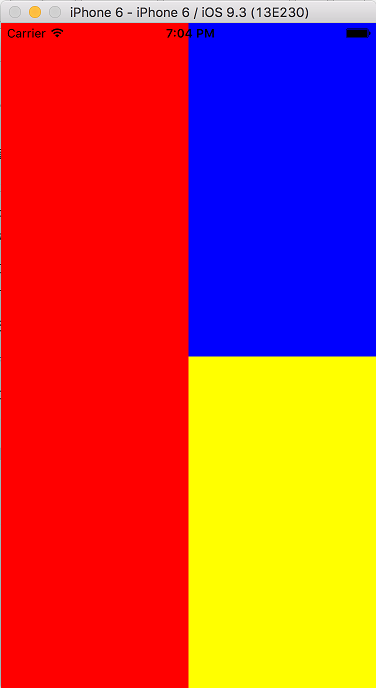
아래와 같이 만들어 보는 것 입니다.
import React, { Component } from 'react';
import { View, StyleSheet, AppRegistry } from 'react-native';
class gitbookTest extends Component {
render() {
return (
<View>
</View>
}
}
}
const styles = StyleSheet.create({
});
AppRegistry.registerComponent('gitbookTest', () => gitbookTest);
위의 코드는 기본 골격입니다. 이 안에 코드를 넣어서 위와 같이 만들어 보세요.
크게 가로, 세로로 1대1이고(left, right), 오른쪽은 위, 아래 1대1로(rightTop, leftTop)
먼저 left right를 나눠 보시죠..
class gitbookTest extends Component {
  render() {
    return (
      <View style={styles.container}>
        <View style={styles.left}>
        </View>
        <View style={styles.right}>

        </View>
      </View>
    );
  }
}
const styles = StyleSheet.create({
  container: {
    flex: 1,
    flexDirection: 'row',
  },
  left: {
    flex: 1,
    backgroundColor: 'red'
  },
  right: {
    flex: 1,
    flexDirection: 'column',
  },
});
위의 코드를 카피해서 넣어 보세요
왼쪽에 빨간색이 나왔나요?
다음은 오른쪽을 2칸으로 나눠야 겠죠.. 방향을 column으로 하고 righTop, rightBottom
class gitbookTest extends Component {
  render() {
    return (
      <View style={styles.container}>
        <View style={styles.left}>
        </View>
        <View style={styles.right}>
          <View style={styles.rightTop}>
          </View>
          <View style={styles.rightBottom}>
          </View>
        </View>
      </View>
    );
  }
}
const styles = StyleSheet.create({
  container: {
    flex: 1,
    flexDirection: 'row',
  },
  left: {
    flex: 1,
    backgroundColor: 'red'
  },
  right: {
    flex: 1,
    flexDirection: 'column',
  },
  rightTop: {
    flex: 1,
    backgroundColor: 'blue'
  },
  rightBottom: {
    flex: 1,
    backgroundColor: 'yellow'
  }

});
제대로 나왔나요?
|
댓글을 작성하시려면 로그인이 필요합니다.