


[관리자] 쇼핑몰 분류관리에서 모바일 이미지 크기 조절
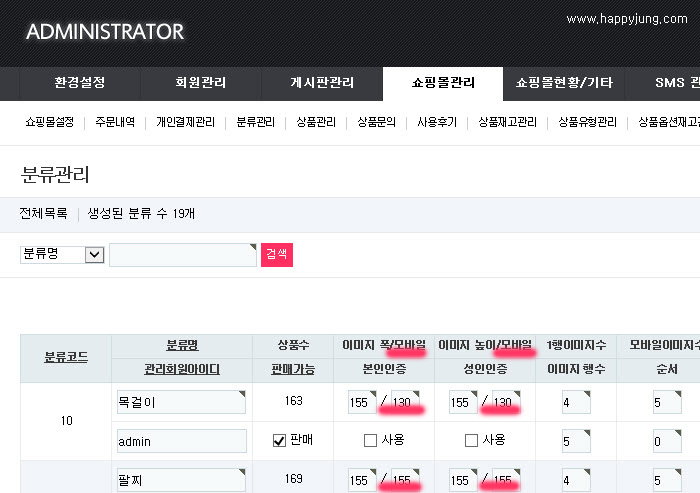
현재 영카트의 모바일 이미지의 폭과 높이를 설정하려면 아래와 같습니다.
관리자 > 분류관리 > 수정하고자하는 분류의 수정 > 값변경 > 저장
... 이렇게 분류를 하나씩 찾아다니면서 수정을 해야합니다.
... 게시판 설정의 전체 분류를 한번에 수정하게 해주는 기능을 없죠
이것을 위와 같은 모습으로 개선하는 팁입니다.
1-1. 영카트5 / adm / shop_admin / categorylist.php 111~ 112줄
<th scope="col" id="sct_imgw">이미지 폭</th>
<th scope="col" id="sct_imgh">이미지 높이</th>
↓↓↓↓↓↓↓↓↓↓↓↓↓↓↓ 변경 ↓↓↓↓↓↓↓↓↓↓↓↓↓↓↓
<th scope="col" id="sct_imgw">이미지 폭/모바일</th>
<th scope="col" id="sct_imgh">이미지 높이/모바일</th>
1-2. 영카트5 / adm / shop_admin / categorylist.php 184 ~ 189줄
<label for="ca_out_width<?php echo $i; ?>" class="sound_only">출력이미지 폭</label>
<input type="text" name="ca_img_width[<?php echo $i; ?>]" value="<?php echo get_text($row['ca_img_width']); ?>" id="ca_out_width<?php echo $i; ?>" required class="required frm_input" size="3" > <span class="sound_only">픽셀</span>
</td>
<td headers="sct_imgh" class="td_output">
<label for="ca_img_height<?php echo $i; ?>" class="sound_only">출력이미지 높이</label>
<input type="text" name="ca_img_height[<?php echo $i; ?>]" value="<?php echo $row['ca_img_height']; ?>" id="ca_img_height<?php echo $i; ?>" required class="required frm_input" size="3" > <span class="sound_only">픽셀</span>
↓↓↓↓↓↓↓↓↓↓↓↓↓↓↓ 변경 ↓↓↓↓↓↓↓↓↓↓↓↓↓↓↓
<label for="ca_out_width<?php echo $i; ?>" class="sound_only">출력이미지 폭</label>
<input type="text" name="ca_img_width[<?php echo $i; ?>]" value="<?php echo get_text($row['ca_img_width']); ?>" id="ca_out_width<?php echo $i; ?>" required class="required frm_input" size="3" > / <input type="text" name="ca_mobile_img_width[<?php echo $i; ?>]" value="<?php echo get_text($row['ca_mobile_img_width']); ?>" id="ca_mobile_img_width<?php echo $i; ?>" required class="required frm_input" size="3" > <span class="sound_only">픽셀</span>
</td>
<td headers="sct_imgh" class="td_output">
<label for="ca_img_height<?php echo $i; ?>" class="sound_only">출력이미지 높이</label>
<input type="text" name="ca_img_height[<?php echo $i; ?>]" value="<?php echo $row['ca_img_height']; ?>" id="ca_img_height<?php echo $i; ?>" required class="required frm_input" size="3" > / <input type="text" name="ca_mobile_img_height[<?php echo $i; ?>]" value="<?php echo $row['ca_mobile_img_height']; ?>" id="ca_mobile_img_height<?php echo $i; ?>" required class="required frm_input" size="3" > <span class="sound_only">픽셀</span>
2. 영카트5 / adm / shop_admin / categorylistupdate.php 34줄
ca_stock_qty = '{$_POST['ca_stock_qty'][$i]}'
↓↓↓↓↓↓↓↓↓↓↓↓↓↓↓ 변경 ↓↓↓↓↓↓↓↓↓↓↓↓↓↓↓
ca_stock_qty = '{$_POST['ca_stock_qty'][$i]}', ca_mobile_img_width = '{$_POST['ca_mobile_img_width'][$i]}', ca_mobile_img_height= '{$_POST['ca_mobile_img_height'][$i]}'
관리자 > 분류관리 > 수정하고자하는 분류의 수정 > 값변경 > 저장
... 이렇게 분류를 하나씩 찾아다니면서 수정을 해야합니다.
... 게시판 설정의 전체 분류를 한번에 수정하게 해주는 기능을 없죠
이것을 위와 같은 모습으로 개선하는 팁입니다.
1-1. 영카트5 / adm / shop_admin / categorylist.php 111~ 112줄
<th scope="col" id="sct_imgw">이미지 폭</th>
<th scope="col" id="sct_imgh">이미지 높이</th>
↓↓↓↓↓↓↓↓↓↓↓↓↓↓↓ 변경 ↓↓↓↓↓↓↓↓↓↓↓↓↓↓↓
<th scope="col" id="sct_imgw">이미지 폭/모바일</th>
<th scope="col" id="sct_imgh">이미지 높이/모바일</th>
1-2. 영카트5 / adm / shop_admin / categorylist.php 184 ~ 189줄
<label for="ca_out_width<?php echo $i; ?>" class="sound_only">출력이미지 폭</label>
<input type="text" name="ca_img_width[<?php echo $i; ?>]" value="<?php echo get_text($row['ca_img_width']); ?>" id="ca_out_width<?php echo $i; ?>" required class="required frm_input" size="3" > <span class="sound_only">픽셀</span>
</td>
<td headers="sct_imgh" class="td_output">
<label for="ca_img_height<?php echo $i; ?>" class="sound_only">출력이미지 높이</label>
<input type="text" name="ca_img_height[<?php echo $i; ?>]" value="<?php echo $row['ca_img_height']; ?>" id="ca_img_height<?php echo $i; ?>" required class="required frm_input" size="3" > <span class="sound_only">픽셀</span>
↓↓↓↓↓↓↓↓↓↓↓↓↓↓↓ 변경 ↓↓↓↓↓↓↓↓↓↓↓↓↓↓↓
<label for="ca_out_width<?php echo $i; ?>" class="sound_only">출력이미지 폭</label>
<input type="text" name="ca_img_width[<?php echo $i; ?>]" value="<?php echo get_text($row['ca_img_width']); ?>" id="ca_out_width<?php echo $i; ?>" required class="required frm_input" size="3" > / <input type="text" name="ca_mobile_img_width[<?php echo $i; ?>]" value="<?php echo get_text($row['ca_mobile_img_width']); ?>" id="ca_mobile_img_width<?php echo $i; ?>" required class="required frm_input" size="3" > <span class="sound_only">픽셀</span>
</td>
<td headers="sct_imgh" class="td_output">
<label for="ca_img_height<?php echo $i; ?>" class="sound_only">출력이미지 높이</label>
<input type="text" name="ca_img_height[<?php echo $i; ?>]" value="<?php echo $row['ca_img_height']; ?>" id="ca_img_height<?php echo $i; ?>" required class="required frm_input" size="3" > / <input type="text" name="ca_mobile_img_height[<?php echo $i; ?>]" value="<?php echo $row['ca_mobile_img_height']; ?>" id="ca_mobile_img_height<?php echo $i; ?>" required class="required frm_input" size="3" > <span class="sound_only">픽셀</span>
2. 영카트5 / adm / shop_admin / categorylistupdate.php 34줄
ca_stock_qty = '{$_POST['ca_stock_qty'][$i]}'
↓↓↓↓↓↓↓↓↓↓↓↓↓↓↓ 변경 ↓↓↓↓↓↓↓↓↓↓↓↓↓↓↓
ca_stock_qty = '{$_POST['ca_stock_qty'][$i]}', ca_mobile_img_width = '{$_POST['ca_mobile_img_width'][$i]}', ca_mobile_img_height= '{$_POST['ca_mobile_img_height'][$i]}'
첨부파일
|
댓글을 작성하시려면 로그인이 필요합니다.
댓글 5개
--> 최신버전은 97,98 줄 입니다
-> 최신버젼은 178줄 부터 시작합니다
ca_stock_qty = '{$_POST['ca_stock_qty'][$i]}'
--> 이게 신 버젼에는 없습니다
정보 감사합니다. ^^