

영카트 모바일 상품 상세정보 페이지 보기 방식을 PC 화면처럼 바꾸기
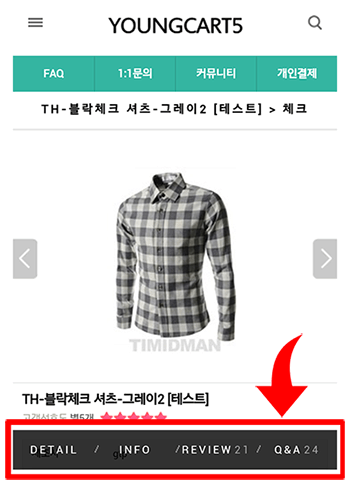
영카트 모바일에서 상품 상세정보 페이지를 볼 때 상품정보, 후기, 문의, 배송정보 등을 확인하려면
PC 화면처럼 같은 페이지에서 모두 출력되는 게 아니라 새로운 창을 띄워야 확인할 수 있습니다.
아래 내용은 모바일에서도 PC 화면처럼 상품 상세정보 보기 방식을 바꾸는 방법입니다.
영카트5 basic 테마 스킨을 사용했을 때 기준입니다.
/theme/basic/mobile/skin/shop/basic/iteminfo.info.skin.php
위 파일 하단에 아래 내용을 추가합니다.
<h2 class="if_tit">배송정보</h2>
<div class="win_desc_if">
<?php echo conv_content($default['de_baesong_content'], 1); ?>
</div>
<h2 class="if_tit">교환/반품</h2>
<div class="win_desc_if">
<?php echo conv_content($default['de_change_content'], 1); ?>
</div>
<h1 class="tit_no">사용후기</h1>
<div id="itemuse" class="win_desc">
<?php include_once('./itemuse.php'); ?>
</div>
<h1 class="tit_no">상품문의</h1>
<div id="itemqa" class="win_desc">
<?php include_once('./itemqa.php'); ?>
</div>
/mobile/shop/item.php 파일 하단쯤에 있는 아래 내용을 찾은 후에
<?php
// 상품 구입폼
include_once($skin_dir.'/item.form.skin.php');
?>
여기 바로 아랫줄에 아래 내용을 추가합니다.
<?php
// 상품 상세정보
include_once($skin_dir.'/iteminfo.info.skin.php');
?>
/theme/basic/mobile/skin/shop/basic/item.form.skin.php 파일에서 아래 내용을 삭제합니다.
<ul id="sit_more">
<li><a href="<?php echo $href; ?>" target="_blank">DETAIL</a></li>
<?php if ($default['de_baesong_content']) { ?><li><a href="<?php echo $href; ?>&info=dvr" target="_blank">INFO</a></li><?php } ?>
<li><a href="<?php echo $href; ?>&info=use" target="_blank">REVIEW<span class="item_use_count"><?php echo $item_use_count; ?></span></a></li>
<li><a href="<?php echo $href; ?>&info=qa" target="_blank">Q&A<span class="item_qa_count"><?php echo $item_qa_count; ?></span></a></li>
</ul>
/shop/itemqaformupdate.php 파일에서
$url = './iteminfo.php?it_id='.$it_id.'&info=qa';
윗줄을 이렇게 수정
$url = "./item.php?it_id=$it_id&_=".get_token()."#itemqa";
/shop/itemuseformupdate.php 파일에서도 마찬가지로
$url = './iteminfo.php?it_id='.$it_id.'&info=use';
윗줄을 이렇게 수정
$url = "./item.php?it_id=$it_id&_=".get_token()."#itemuse";
// 추가 내용
위 내용은 원본을 수정해야 해서 다른 방법으로 바꾸었습니다.
http://gnustudy.com/bbs/board.php?bo_table=yc_tip&wr_id=3
PC 화면처럼 같은 페이지에서 모두 출력되는 게 아니라 새로운 창을 띄워야 확인할 수 있습니다.
아래 내용은 모바일에서도 PC 화면처럼 상품 상세정보 보기 방식을 바꾸는 방법입니다.
영카트5 basic 테마 스킨을 사용했을 때 기준입니다.
/theme/basic/mobile/skin/shop/basic/iteminfo.info.skin.php
위 파일 하단에 아래 내용을 추가합니다.
<h2 class="if_tit">배송정보</h2>
<div class="win_desc_if">
<?php echo conv_content($default['de_baesong_content'], 1); ?>
</div>
<h2 class="if_tit">교환/반품</h2>
<div class="win_desc_if">
<?php echo conv_content($default['de_change_content'], 1); ?>
</div>
<h1 class="tit_no">사용후기</h1>
<div id="itemuse" class="win_desc">
<?php include_once('./itemuse.php'); ?>
</div>
<h1 class="tit_no">상품문의</h1>
<div id="itemqa" class="win_desc">
<?php include_once('./itemqa.php'); ?>
</div>
/mobile/shop/item.php 파일 하단쯤에 있는 아래 내용을 찾은 후에
<?php
// 상품 구입폼
include_once($skin_dir.'/item.form.skin.php');
?>
여기 바로 아랫줄에 아래 내용을 추가합니다.
<?php
// 상품 상세정보
include_once($skin_dir.'/iteminfo.info.skin.php');
?>
/theme/basic/mobile/skin/shop/basic/item.form.skin.php 파일에서 아래 내용을 삭제합니다.
<ul id="sit_more">
<li><a href="<?php echo $href; ?>" target="_blank">DETAIL</a></li>
<?php if ($default['de_baesong_content']) { ?><li><a href="<?php echo $href; ?>&info=dvr" target="_blank">INFO</a></li><?php } ?>
<li><a href="<?php echo $href; ?>&info=use" target="_blank">REVIEW<span class="item_use_count"><?php echo $item_use_count; ?></span></a></li>
<li><a href="<?php echo $href; ?>&info=qa" target="_blank">Q&A<span class="item_qa_count"><?php echo $item_qa_count; ?></span></a></li>
</ul>
/shop/itemqaformupdate.php 파일에서
$url = './iteminfo.php?it_id='.$it_id.'&info=qa';
윗줄을 이렇게 수정
$url = "./item.php?it_id=$it_id&_=".get_token()."#itemqa";
/shop/itemuseformupdate.php 파일에서도 마찬가지로
$url = './iteminfo.php?it_id='.$it_id.'&info=use';
윗줄을 이렇게 수정
$url = "./item.php?it_id=$it_id&_=".get_token()."#itemuse";
// 추가 내용
위 내용은 원본을 수정해야 해서 다른 방법으로 바꾸었습니다.
http://gnustudy.com/bbs/board.php?bo_table=yc_tip&wr_id=3
첨부파일
|
댓글을 작성하시려면 로그인이 필요합니다.
댓글 9개
http://gnustudy.com/bbs/board.php?bo_table=yc_tip&wr_id=3