

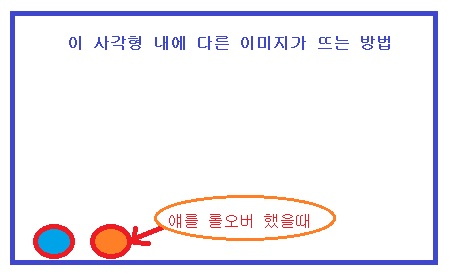
그냥 이미지 롤오버 하는 방법은 알겠는데
위와 같게 하려면 어뜨케 해야 하나여?
같은창에 메뉴이미지 (주황색동그라미 부분) 넣고
롤오버하면 같은창(파란색사각형)내에 다른 이미지가 크게 보이는 방법요....
갈켜 주시면 감사합니다~^.^
|
답변 1개 / 댓글 1개
채택된 답변
+20 포인트
2014-06-14 (토) 22:59:01
Copy
<html>    <style>        .numberBox {            list-style: none;            text-align: center;        }        .numberBox > LI {            display: inline;            padding: 5px;            border: 1px solid #dadada;        }        .numberBox > LI.selected {            font-weight: bold;        }        .imageBox > IMG {            border: 0px;            display: none;        }    </style>    <script src="http://code.jquery.com/jquery-1.9.1.min.js"></script>    <script>        $(function () {            $(".numberBox > LI").mouseover(function () { //class="imageBox"의 자식중 LI에 마우스를 올렸을때 실행.                       var eq = $(".numberBox > LI").index($(this)), //선택한 번호의 순번                       parent = $(this).parent(); //부모 Element                       if ($(this).hasClass('selected')) return; //현재 선택된 번호라면 리턴                       //부모(ul)의 하위자식(LI)의 class="selected"를 제거하고, 선택한 순번에 class="selected" 를 추가.
                parent.children().removeClass('selected').eq(eq).addClass('selected');                //class="imageBox"의 하위자식을 모두 숨기고, 선택한 순번을 보이도록 변경.                       $(".imageBox").children().hide().eq(eq).show();            })        })    </script> <ul class="numberBox">        <li class="selected">1</li>        <li>2</li>        <li>3</li>    </ul>    <div class="imageBox">        <img src="http://sstatic.naver.net/search/img3/h1_naver2.png" style="display:inline" />        <img src="http://icon.daumcdn.net/w/icon/1406/13/180149217.jpg" />        <img src="http://icon.daumcdn.net/w/icon/1406/13/185922776.png" />    </div></html>

답변에 대한 댓글 1개
새야1204
2014-06-16 (월) 22:17:35
답변을 작성하려면 로그인이 필요합니다.
감사합니다~^^