

swiper 관련 질문입니다 채택완료

챗gpt와 3일째 해결을 못하고 있어 글 남깁니다 ㅠ.ㅠ

파란색 형광펜 친 곳에 원래 ㅇ ㅇ ㅇ 이렇게 swiper-pagination이 생깁니다
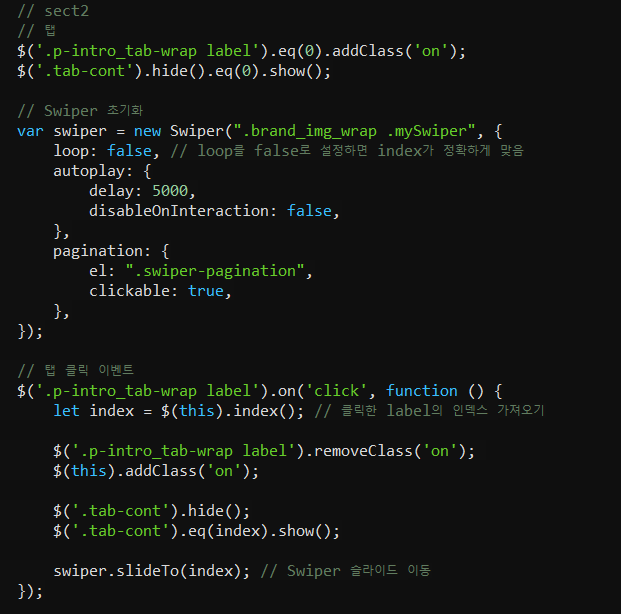
왼쪽 버튼을 누르면 각 순서에 맞는 사진이 뜨고 (여기까지는 현재 됩니다)
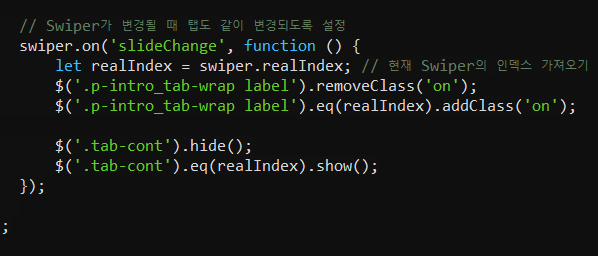
자동으로 swiper가 되는 기능을 구현하고 싶습니다
자동으로 슬라이드가 되면서 label도 각 사진에 맞는 label에 on 효과를 주고 싶습니다 (글자 파란색 + 밑줄 파란색)
html, css, js, 홈페이지 url 주소 남깁니다
도와주세요 ㅠㅠ
[html]

[css]

[js]
답변 1개
채택된 답변
+20 포인트
 glitter0gim
10개월 전
쳇gpt 친구를 다독였습니다.
*HTML
Copy
Brand Story


        Brand Story


        인체 양막 유래 줄기세포 배양액 기술로


        혁신적인 피부 & 헤어 케어 솔루션입니다.


        한국어 카테지션

        엑소좀 (Exosome)

        한국 제품 특징


        자세히 보기
*style.css
Copy
/* 공통 초기화 (선택사항)

* {

  margin: 0;

  padding: 0;

  box-sizing: border-box;

}

*/

/* =============================

   섹션 1 : 브랜드 소개 스타일

   ============================= */

.section1 .brand_wrap {

  display: flex;

  /* 원하는 레이아웃 설정 */

}

.section1 .brand_left_wrap {

  width: 40%;

  /* 왼쪽 영역에 이미지나 텍스트 추가 시 */

}

.section1 .main_text_wrap {

  width: 60%;

  padding: 40px;

  box-sizing: border-box;

}

.section1 h1 {

  font-size: 2rem;

  margin-bottom: 20px;

}

/* =============================

   섹션 2 : 탭 & 슬라이드 영역

   ============================= */

/* 탭 영역 */

.p-intro_wrap {

  display: flex;

  align-items: center;

  justify-content: space-between;

  margin: 40px 0;

}

.p-intro_tab-wrap {

  display: flex;

  gap: 20px; /* 탭 간격 */

}

.p-intro_tab-wrap label {

  cursor: pointer;

  padding: 5px 10px;

  color: #666;

  border-bottom: 2px solid transparent;

  transition: 0.3s;

}

.p-intro_tab-wrap label.on {

  /* 활성 탭 상태: 파란색 글자 + 파란색 밑줄 */

  color: #2196f3;

  border-color: #2196f3;

}

/* 자세히 보기 버튼 */

.detail_btn {

  display: inline-block;

  background: #333;

  color: #fff;

  padding: 10px 20px;

  border-radius: 4px;

  text-decoration: none;

  transition: 0.3s;

}

.detail_btn:hover {

  background: #666;

}

/* 슬라이드 영역 */

.brand_img_wrap {

  position: relative;

  /* 필요 시 크기 지정: width, height 등 */

}

.tab-cont {

  display: none; /* 초기엔 숨김 */

}

/* Swiper가 슬라이드를 제어할 때 display 사용하므로, 아래처럼 스타일 */

.swiper-slide {

  display: flex;

  justify-content: center;

  align-items: center;

  /* 필요 시 높이, 너비 지정 */

}

.swiper-slide img {

  width: 100%;

  height: auto;

  display: block;

}

/* Swiper 페이지네이션 불릿 (ㅇ ㅇ ㅇ) */

.swiper-pagination {

  position: absolute;

  bottom: 10px; /* 위치 조정 */

  left: 50%;

  transform: translateX(-50%);

}

.swiper-pagination-bullet {

  background: #ccc;

  opacity: 0.7;

  margin: 0 4px; /* 불릿 간격 */

  transition: opacity 0.3s;

}

.swiper-pagination-bullet-active {

  background: #2196f3; /* 활성화된 불릿 색상 */

  opacity: 1;

}

/* ============================================

   (선택) brand_story_page-1__point.png 사용 시

   ============================================ */

/*

.swiper-pagination-bullet {

  width: 16px;

  height: 16px;

  background: url('images/brand_story_page-1__point.png') no-repeat center/cover;

  opacity: 0.5;

  margin: 0 4px;

  transition: opacity 0.3s;

}

.swiper-pagination-bullet-active {

  opacity: 1;

}

*/
*script.js
Copy
$(document).ready(function () {

  // 초기 상태: 첫 번째 탭 활성화

  $('.p-intro_tab-wrap label').eq(0).addClass('on');

  $('.tab-cont').hide().eq(0).show();

  // Swiper 초기화

  var swiper = new Swiper('.brand_img_wrap.mySwiper', {

    loop: false, // loop:true 시 인덱스 주의 (this.realIndex)

    autoplay: {

      delay: 3000,              // 자동 슬라이드 간격 (ms)

      disableOnInteraction: false // 사용자 조작 후에도 자동슬라이드 유지

    },

    pagination: {

      el: '.swiper-pagination',

      clickable: true

      // (선택) renderBullet 등으로 커스텀 가능

    },

    on: {

      slideChange: function () {

        // 현재 활성 슬라이드 인덱스 (0부터 시작)

        let idx = this.activeIndex;

        // 탭 on 클래스 갱신

        $('.p-intro_tab-wrap label').removeClass('on');

        $('.p-intro_tab-wrap label').eq(idx).addClass('on');

        // 해당 인덱스의 콘텐츠만 보이도록 처리

        $('.tab-cont').hide().eq(idx).show();

      }

    }

  });

  // 탭(label) 클릭 이벤트

  $('.p-intro_tab-wrap label').on('click', function () {

    let index = $(this).index();

    // 모든 탭에서 on 제거 후, 현재 탭에 on

    $('.p-intro_tab-wrap label').removeClass('on');

    $(this).addClass('on');

    // 해당 탭 인덱스에 맞는 콘텐츠만 표시

    $('.tab-cont').hide().eq(index).show();

    // Swiper 슬라이드 이동

    swiper.slideTo(index);

  });

});
로그인 후 평가할 수 있습니다
답변에 대한 댓글 2개
댓글을 작성하려면 로그인이 필요합니다.
답변을 작성하려면 로그인이 필요합니다.
로그인