

jQuery Filter - 폼 필터 Form Filter
폼 필터
폼 필터는 형식(text, checkbox, password, radio, file)을 기반으로 하는 폼 요소를 선택할 때 사용하는 필터로 사용법은 필터와 동일하여, 자세한 설명보다는 아래의 표로 대신 합니다.
|
폼 필터 종류 |
선택 폼 |
|
:button |
<input type=”butto” /> |
|
:checkbox |
<input type=”checkbox” /> |
|
:checked |
<input type=”checkbox” checked=”checked” /> |
|
:disabled |
<input type=”text” disabled=”disabled” /> |
|
:enabled |
<input type=”text” enabled=”enabled” /> |
|
:file |
<input type=”file” /> |
|
:focus |
(1.6 이상에서 지원) |
|
:image |
<input type=”image” /> |
|
:input |
<input> 모든 input 요소 |
|
:password |
<input type=”password” /> |
|
:radio |
<input type=”radio” /> |
|
:reset |
<input type=”reset” /> |
|
:selected |
<select><option selected="selected"></option></select> |
|
:submit |
<input type=”submit” /> |
|
:text |
<input type=”text” /> |
|
:hidden |
<input type=”hidden” /> |
| 표 1. [jQuery 폼 필터의 종류] | |
표에서 보듯이 폼 필터 사용은 매우 간단하여 자세한 설명을 생략하고 필터 중 상태를 체크하는 필터에 대해 알아 보도록 하겠습니다.
:checked , :selected
<input type=”checkbox”/>체크박스, 라디오버튼<input type=”radio” />, 셀렉트<select>의 상태를 확인 하여 선택된 상태 요소들의 집합을 선택 반환합니다.
<html xmlns="http://www.w3.org/1999/xhtml">
<head>
    <title>jQuery Selector</title>
    <link href="../Styles/Site.css" rel="stylesheet" type="text/css" />
    <style>
        div,pre { background : #FFF; padding:10px; margin:10px; }
        table { border:1px solid #AAA; }
        td { border:1px solid #AAA; width:25px; height:25px; }
    </style>
    <script src="http://code.jquery.com/jquery-latest.js"></script>
    <script type="text/javascript">
        $(document).ready(function () {
            $(":checked,:selected").css("border", "2px solid red");
            $(":selected").css("background", "red");
        });
    </script>
</head>
<body style="padding:10px;">
    <h2>jQuery 시작 Selector</h2>
    <p>jQuery에 대한 자세한 내용을 보려면 jquery.com 을 방문하세요.</p>
    <div>
        <ul>
            <li><input type="checkbox" checked="checked" />CheckBox #1 - </li>
            <li><input type="checkbox" />CheckBox #2</li>
            <li><input type="checkbox" checked="checked" />CheckBox #3</li>
        </ul>
        <select multiple="multiple">
            <option>Option #1</option>
            <option selected="selected">Option #2</option>
            <option>Option #3</option>
        </select>
    </div>
</body>
</html>
[예제 1. 폼필터의 사용예제]
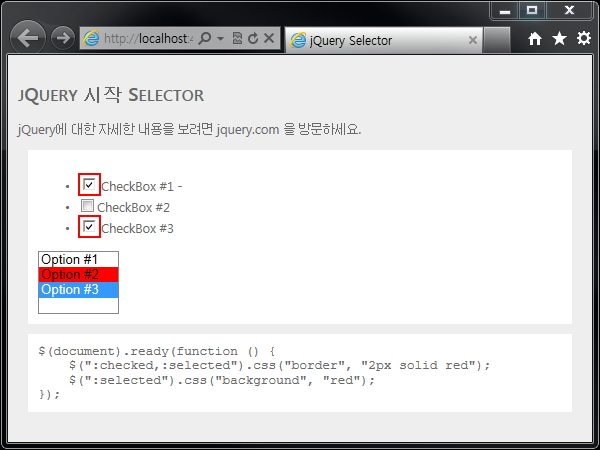
[예제 1 Selected, Checked를 폼 필터를 이용한 결과 모습]
:enabled, :disabled
사용이 가능하거나, 사용이 불가능한 요소를 선택하여 해당 요소의 집합을 반환합니다.
<input type="text" disabled="disabled" />의 경우 :disabled로, 일반적인 모습일 경우 :enabled로 관련 요소의 집합을 선택 할 수 있습니다.
사용이 가능하거나, 사용이 불가능한 요소를 선택하여 해당 요소의 집합을 반환합니다.
<input type="text" disabled="disabled" />의 경우 :disabled로, 일반적인 모습일 경우 :enabled로 관련 요소의 집합을 선택 할 수 있습니다.
|
댓글을 작성하시려면 로그인이 필요합니다.
로그인
프로그램
태그 필터 (최대 3개)
전체
개발자
소스
기타
mysql
팁자료실
javascript
php
linux
flash
정규표현식
jquery
node.js
mobile
웹서버
os
프로그램
강좌
썸네일
이미지관련
도로명주소
그누보드5
기획자
견적서
계약서
기획서
마케팅
제안서
seo
통계
서식
통계자료
퍼블리셔
html
css
반응형
웹접근성
퍼블리싱
표준화
반응형웹
홈페이지기초
부트스트랩
angularjs
포럼
스크린리더
센스리더
개발자톡
개발자팁
퍼블리셔톡
퍼블리셔팁
기획자톡
기획자팁
프로그램강좌
퍼블리싱강좌