

웹접근성심사 홈페이지를 위한 대체텍스트 alt 입력 기능
웹접근성 마크가 있는 홈페이지는 이미지에 대체텍스트(alt)를 입력해야 합니다.
장애인분들을 위해 필요한 내용이죠...
smartteditor2 게시판에 첨부한 분을 위해 간단한 소스 공유합니다.
예시 이미지입니다.
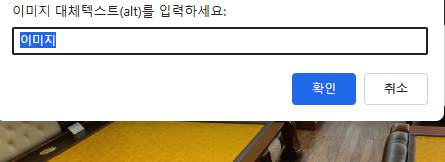
/plugin/editor/smarteditor2/SmartEitor2Skin.html
아래 내용 추가하시면 됩니다.
[code]
<!-- SE2 Markup End -->
<script>
(function() {
function attachImageAltEditor() {
const iframe = document.getElementById("se2_iframe");
if (!iframe) {
return setTimeout(attachImageAltEditor, 500);
}
const editorDoc = iframe.contentDocument || iframe.contentWindow.document;
if (!editorDoc || !editorDoc.body) {
return setTimeout(attachImageAltEditor, 500);
}
// 중복 방지
if (editorDoc.__altEventAttached) return;
editorDoc.__altEventAttached = true;
console.log("SmartEditor2 이미지 ALT 편집기 연결 완료");
editorDoc.addEventListener("click", function(e) {
const target = e.target;
if (target.tagName === "IMG") {
const currentAlt = target.getAttribute("alt") || "";
const newAlt = prompt("이미지 대체텍스트(alt)를 입력하세요.", currentAlt);
if (newAlt !== null) {
target.setAttribute("alt", newAlt.trim());
}
}
});
}
setTimeout(attachImageAltEditor, 500);
})();
</script>
[/code]
댓글 작성
댓글을 작성하시려면 로그인이 필요합니다.
로그인하기
댓글 3개
감사 합니다.
감사합니다.