그누보드 카카오 지도 설정방

그누보드 카카오 지도 설정방

QA

그누보드 카카오 지도 설정방

사용하는 빌더

아미나

본문

안녕하세요 선생님들~~카카오 지도 등록하려하는데요 

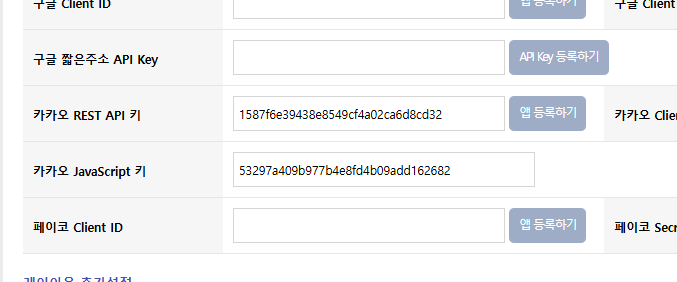
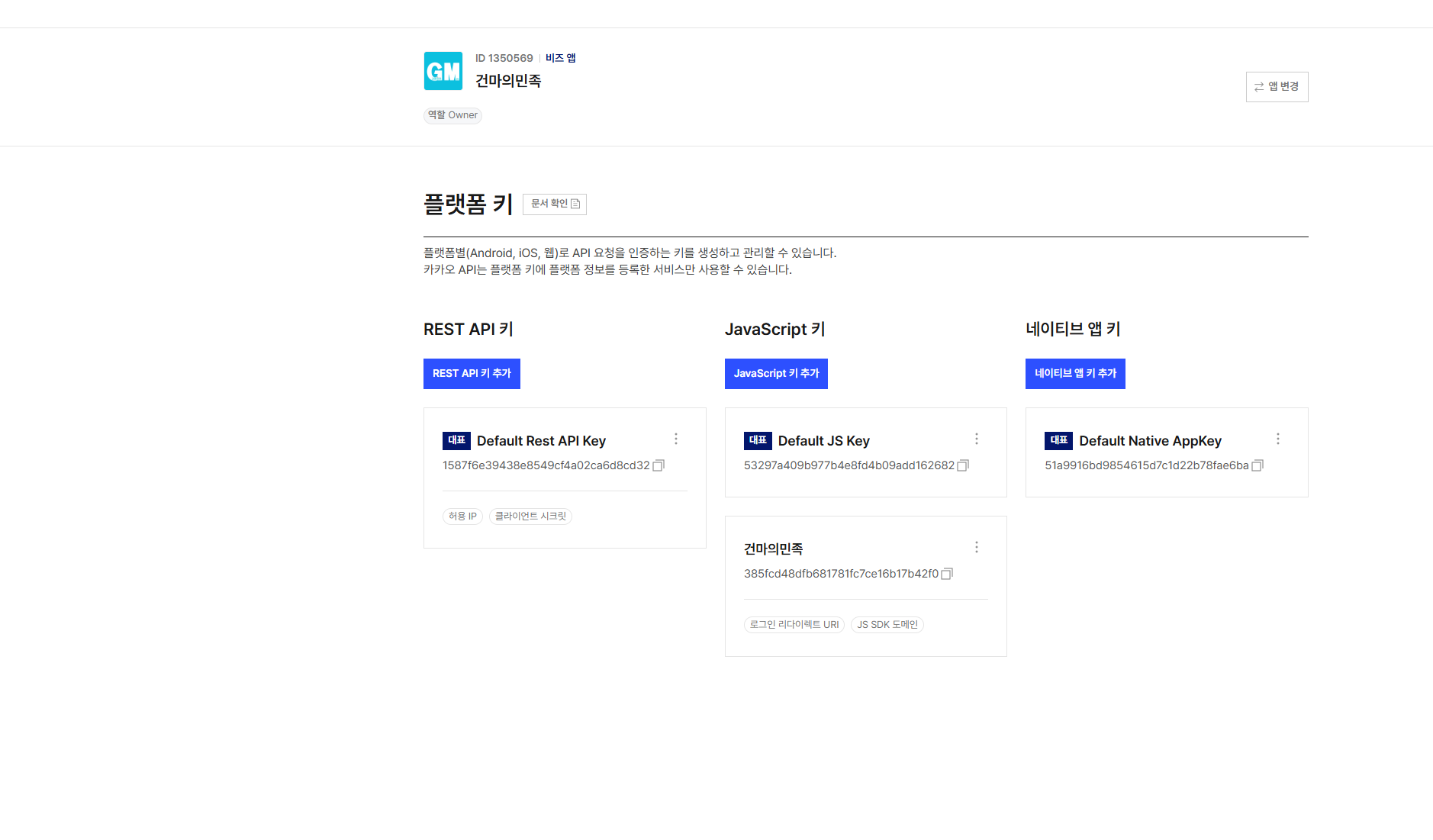
카카오 developers 가서 웹 도메인 등록하고 플랫폼 키 까지 받은 상태인데 
1888874504_1765183816.6966.png그리고 키 받은걸로 해서 그누보드 키 등록했는데...

1888874504_1765183844.5922.png


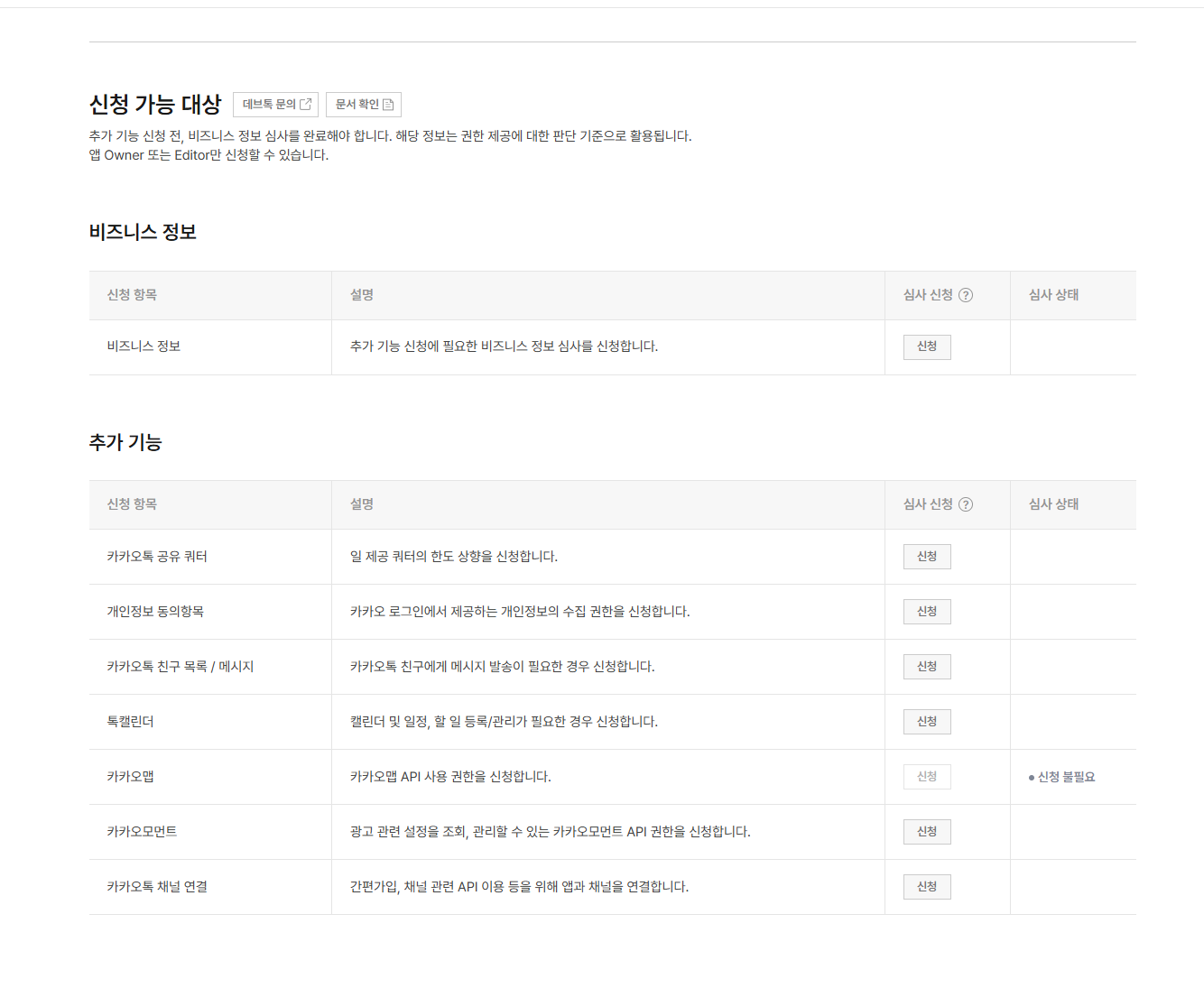
비즈니스 신청을 해야하나요?

카카오지도가 안열리네요 ㅠㅠ

1888874504_1765183877.7823.png


유튭에서 봤는데 봐도 설명이 이해가안가서 코드가 있는데 그걸 복사해서 디비에 넣어야되나요?


이 질문에 댓글 쓰기 :

답변 5


<script type="text/javascript" src="//dapi.kakao.com/v2/maps/sdk.js?appkey=KAKAO_API_KEY&libraries=services"></script>
<style>#map {flex: 1;width: 100%;height: 350px;}#info {padding: 12px;background: #f8f8f8;border-top: 1px solid #ddd;font-size: 15px;}</style>
<h3 style="padding:10px; margin:0;">? 내 위치 확인</h3>
<div id="map"></div>
<div id="info">현재 위치를 불러오는 중...</div>
<script>
let map, marker, geocoder;
function initMap(lat, lon) {
  const mapContainer = document.getElementById('map');
  const mapOption = {
    center: new kakao.maps.LatLng(lat, lon),
    level: 3
  };
  map = new kakao.maps.Map(mapContainer, mapOption);
  // 마커 표시
  const pos = new kakao.maps.LatLng(lat, lon);
  marker = new kakao.maps.Marker({
    position: pos,
    map: map
  });
  // 주소 변환 객체 생성
  geocoder = new kakao.maps.services.Geocoder();
  // 위도·경도를 주소로 변환
  geocoder.coord2Address(lon, lat, function(result, status) {
    const info = document.getElementById('info');
    if (status === kakao.maps.services.Status.OK) {
      const addr = result[0].address ? result[0].address.address_name : result[0].road_address.address_name;
      info.innerHTML = `
        <b>주소:</b> ${addr} <b>위도:</b> ${lat.toFixed(6)} / <b>경도:</b> ${lon.toFixed(6)}
      `;
    } else {
      info.textContent = '주소 정보를 불러오지 못했습니다.';
    }
  });
}
// ✅ 브라우저에서 내 위치 가져오기
if (navigator.geolocation) {
  navigator.geolocation.getCurrentPosition(
    pos => {
      const lat = pos.coords.latitude;
      const lon = pos.coords.longitude;
      initMap(lat, lon);
    },
    err => {
      console.error(err);
      document.getElementById('info').textContent = '위치 정보를 가져오지 못했습니다. (권한 거부 또는 오류)';
    },
    { enableHighAccuracy: true, timeout: 10000 }
  );
} else {
  document.getElementById('info').textContent = '이 브라우저는 위치 정보를 지원하지 않습니다.';
}
</script>

KAKAO_API_KEY <= 여기에 키 넣고 한번 나오는지 보세요.

인덱스에 넣고 하면 지도가 나와야 됩니다.

<script type="text/javascript" src="//dapi.kakao.com/v2/maps/sdk.js?appkey=53297a409b977b4e8fd4b09add162682,libraries=services"></script>
<style>#map {flex: 1;width: 100%;height: 350px;}#info {padding: 12px;background: #f8f8f8;border-top: 1px solid #ddd;font-size: 15px;}</style>
<h3 style="padding:10px; margin:0;">? 내 위치 확인</h3>
<div id="map"></div>
<div id="info">현재 위치를 불러오는 중...</div>
<script>
let map, marker, geocoder;
function initMap(lat, lon) {
  const mapContainer = document.getElementById('map');
  const mapOption = {
    center: new kakao.maps.LatLng(lat, lon),
    level: 3
  };
  map = new kakao.maps.Map(mapContainer, mapOption);
  // 마커 표시
  const pos = new kakao.maps.LatLng(lat, lon);
  marker = new kakao.maps.Marker({
    position: pos,
    map: map
  });
  // 주소 변환 객체 생성
  geocoder = new kakao.maps.services.Geocoder();
  // 위도·경도를 주소로 변환
  geocoder.coord2Address(lon, lat, function(result, status) {
    const info = document.getElementById('info');
    if (status === kakao.maps.services.Status.OK) {
      const addr = result[0].address ? result[0].address.address_name : result[0].road_address.address_name;
      info.innerHTML = `
        <b>주소:</b> ${addr} <b>위도:</b> ${lat.toFixed(6)} / <b>경도:</b> ${lon.toFixed(6)}
      `;
    } else {
      info.textContent = '주소 정보를 불러오지 못했습니다.';
    }
  });
}
// ✅ 브라우저에서 내 위치 가져오기
if (navigator.geolocation) {
  navigator.geolocation.getCurrentPosition(
    pos => {
      const lat = pos.coords.latitude;
      const lon = pos.coords.longitude;
      initMap(lat, lon);
    },
    err => {
      console.error(err);
      document.getElementById('info').textContent = '위치 정보를 가져오지 못했습니다. (권한 거부 또는 오류)';
    },
    { enableHighAccuracy: true, timeout: 10000 }
  );
} else {
  document.getElementById('info').textContent = '이 브라우저는 위치 정보를 지원하지 않습니다.';
}
</script>


이렇게하고 어디다 넣나요? 제가 완전 초보라서요 ㅠㅠ

추천 감사 합니다.


<script type="text/javascript" src="//dapi.kakao.com/v2/maps/sdk.js?appkey=<?php echo $config['cf_kakao_js_apikey'];?>&libraries=services"></script>
<style>#map {flex: 1;width: 100%;height: 350px;}#info {padding: 12px;background: #f8f8f8;border-top: 1px solid #ddd;font-size: 15px;}</style>
<h3 style="padding:10px; margin:0;">? 내 위치 확인</h3>
<div id="map"></div>
<div id="info">현재 위치를 불러오는 중...</div>
<script>
let map, marker, geocoder;
function initMap(lat, lon) {
  const mapContainer = document.getElementById('map');
  const mapOption = {
    center: new kakao.maps.LatLng(lat, lon),
    level: 3
  };
  map = new kakao.maps.Map(mapContainer, mapOption);
  // 마커 표시
  const pos = new kakao.maps.LatLng(lat, lon);
  marker = new kakao.maps.Marker({
    position: pos,
    map: map
  });
  // 주소 변환 객체 생성
  geocoder = new kakao.maps.services.Geocoder();
  // 위도·경도를 주소로 변환
  geocoder.coord2Address(lon, lat, function(result, status) {
    const info = document.getElementById('info');
    if (status === kakao.maps.services.Status.OK) {
      const addr = result[0].address ? result[0].address.address_name : result[0].road_address.address_name;
      info.innerHTML = `
        <b>주소:</b> ${addr} <b>위도:</b> ${lat.toFixed(6)} / <b>경도:</b> ${lon.toFixed(6)}
      `;
    } else {
      info.textContent = '주소 정보를 불러오지 못했습니다.';
    }
  });
}
// ✅ 브라우저에서 내 위치 가져오기
if (navigator.geolocation) {
  navigator.geolocation.getCurrentPosition(
    pos => {
      const lat = pos.coords.latitude;
      const lon = pos.coords.longitude;
      initMap(lat, lon);
    },
    err => {
      console.error(err);
      document.getElementById('info').textContent = '위치 정보를 가져오지 못했습니다. (권한 거부 또는 오류)';
    },
    { enableHighAccuracy: true, timeout: 10000 }
  );
} else {
  document.getElementById('info').textContent = '이 브라우저는 위치 정보를 지원하지 않습니다.';
}
</script>

이 코드를 보기를 원하는 위치에 넣으면 됩니다.
index.php 아래쪽에 넣고 실험해 보세요.
그리고 설국열차 님의 답변 보시고 https://developers.kakao.com/ 에서 설정도 잘 하셔야 합니다.

요즘은 지도도 따로 신청해야하는걸로 기억을 하고 있습니다. 신청하시고 예제 소스에 따라서 맵이 나오는지 확인해보셔야 할 거 같습니다. 해당만 가지고는 어떻게 소스를 하셨는지 알수는 없습니다. 그누 기본에서 맵이 나오는 경우는 없어서요.


<script type="text/javascript" src="//dapi.kakao.com/v2/maps/sdk.js?appkey=이곳에 javascript 키를 넣으면 됩니다.&libraries=services"></script>

appkey 의 값에 javascript 키를 넣으면 됩니다.
 

990952140_1765191772.4603.png


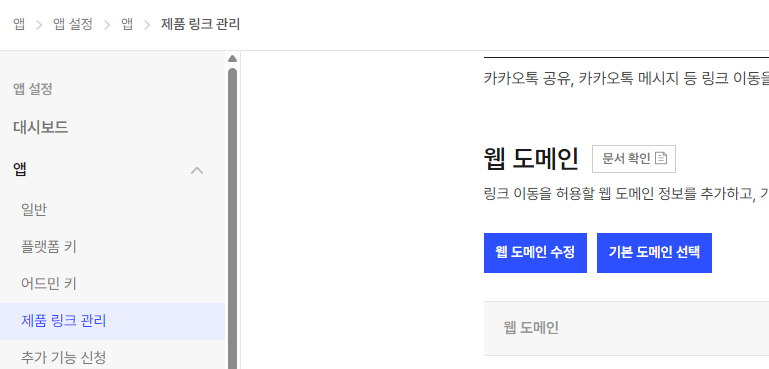
그리고 앱을 만들고 난 후
이곳에서 사용 하는 도메인을 등록해 줘야 합니다.

<script type="text/javascript" src="//dapi.kakao.com/v2/maps/sdk.js?appkey=53297a409b977b4e8fd4b09add162682,libraries=services"></script>
<style>#map {flex: 1;width: 100%;height: 350px;}#info {padding: 12px;background: #f8f8f8;border-top: 1px solid #ddd;font-size: 15px;}</style>
<h3 style="padding:10px; margin:0;">? 내 위치 확인</h3>
<div id="map"></div>
<div id="info">현재 위치를 불러오는 중...</div>
<script>
let map, marker, geocoder;
function initMap(lat, lon) {
  const mapContainer = document.getElementById('map');
  const mapOption = {
    center: new kakao.maps.LatLng(lat, lon),
    level: 3
  };
  map = new kakao.maps.Map(mapContainer, mapOption);
  // 마커 표시
  const pos = new kakao.maps.LatLng(lat, lon);
  marker = new kakao.maps.Marker({
    position: pos,
    map: map
  });
  // 주소 변환 객체 생성
  geocoder = new kakao.maps.services.Geocoder();
  // 위도·경도를 주소로 변환
  geocoder.coord2Address(lon, lat, function(result, status) {
    const info = document.getElementById('info');
    if (status === kakao.maps.services.Status.OK) {
      const addr = result[0].address ? result[0].address.address_name : result[0].road_address.address_name;
      info.innerHTML = `
        <b>주소:</b> ${addr} <b>위도:</b> ${lat.toFixed(6)} / <b>경도:</b> ${lon.toFixed(6)}
      `;
    } else {
      info.textContent = '주소 정보를 불러오지 못했습니다.';
    }
  });
}
// ✅ 브라우저에서 내 위치 가져오기
if (navigator.geolocation) {
  navigator.geolocation.getCurrentPosition(
    pos => {
      const lat = pos.coords.latitude;
      const lon = pos.coords.longitude;
      initMap(lat, lon);
    },
    err => {
      console.error(err);
      document.getElementById('info').textContent = '위치 정보를 가져오지 못했습니다. (권한 거부 또는 오류)';
    },
    { enableHighAccuracy: true, timeout: 10000 }
  );
} else {
  document.getElementById('info').textContent = '이 브라우저는 위치 정보를 지원하지 않습니다.';
}
</script>


위 들레아빠님 복사하고 열차님이 키 넣으라는곳에 넣었습니다 이 소스를 어디에다 넣으면 되나요?

요즘은 카카오맵이 비즈니스앱으로 등록해야 사용이 가능합니다.

비즈니스앱 = 결제카드 등록하고 신청하는것.


그냥 네이버지도로 하세요.

네이버지도는 개발자등록만 하면 카드등록 안하고도 api 키 발급이 가능합니다.


요즘 카카오가 구글 왜이렇게 따라하는지 모르겠네요.

주제를 모르고...

길찾기/교통 데이터가 중요하다면 → 네이버 지도 API가 유리
로드뷰, 카카오 서비스 연동이 필요하다면 → 카카오 지도 API가 편리
주소 변환 정확도는 네이버가 조금 더 안정적이라는 평가가 많음
개발 난이도는 카카오가 상대적으로 단순, 네이버는 기능이 많아 구조가 조금 복잡

하여

네이버 지도 API와 카카오 지도 API는 각각 장단점이 있어서 더좋다 /안좋다 라기보다는 프로젝트 목적에 따라 선택하는 게 맞을것 같습니다. ^^

답변을 작성하시기 전에 로그인 해주세요.
전체 129,664 | RSS
QA 내용 검색

회원로그인

(주)에스아이알소프트 / 대표:홍석명 / (06211) 서울특별시 강남구 역삼동 707-34 한신인터밸리24 서관 1402호 / E-Mail: admin@sir.kr
사업자등록번호: 217-81-36347 / 통신판매업신고번호:2014-서울강남-02098호 / 개인정보보호책임자:김민섭(minsup@sir.kr)
© SIRSOFT