
최근게시물 클릭후 나오는 이미지 레이어 하단에 제품명을 넣고 싶습니다.
본문
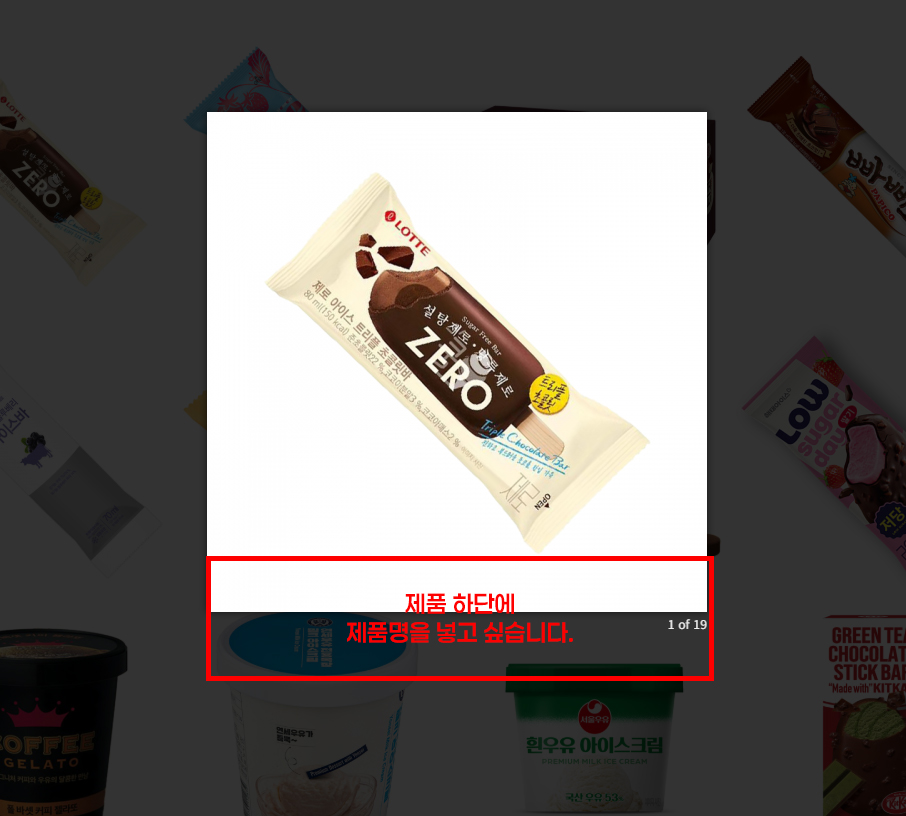
인덱스 페이지에서 갤러리스타일 최신게시물 클릭하면 이렇게 제품이미지가 뜹니다.
제품 이미지 하단에
제품명이 같이 표시되도록 하고 싶은데, 어디를 수정해야 할까요?
제가 그누보드를 잘 몰라서 여쭤봅니다.
<?php
if (!defined('_GNUBOARD_')) exit; // 개별 페이지 접근 불가
include_once(G5_LIB_PATH.'/thumbnail.lib.php');
// add_stylesheet('css 구문', 출력순서); 숫자가 작을 수록 먼저 출력됨
add_stylesheet('<link rel="stylesheet" href="'.$latest_skin_url.'/style.css">', 0);
$thumb_width = 500;
$thumb_height = 500;
?>


    <?php
    for ($i=0; $i<count($list); $i++) {
    $thumb = get_list_thumbnail($bo_table, $list[$i]['wr_id'], $thumb_width, $thumb_height, false, true);
    if($thumb['src']) {
        $img = $thumb['src'];
    } else {
        $img = G5_IMG_URL.'/no_img.png';
        $thumb['alt'] = '이미지가 없습니다.';
    }
    $img_content = ''.$img.'';
    ?>
    <div class="cbp-item <?php echo $list[$i]['ca_name'] ?>">
        <a class="cbp-caption cbp-lightbox" href="<?php echo $img_content; ?>">
            <div class="cbp-caption-defaultWrap">
                <img alt="port-1" src="<?php echo $img_content; ?>">
            </div>
            <div class="cbp-caption-activeWrap"></div>
            <div class="cbp-l-caption-alignCenter center-block">
                <div class="cbp-l-caption-body">
                    <div class="plus"></div>
                    <h5 class="text-white mb-1"><?php echo $list[$i]['subject'] ?></h5>
                    <p class="text-white"><?php echo $list[$i]['wr_1'] ?></p>
                </div>
            </div>
        </a>
    </div>

    <?php }  ?>
    <?php if (count($list) == 0) { //게시물이 없을 때  ?>
    <li class="empty_li">게시물이 없습니다.</li>
    <?php }  ?>
최근게시물 스킨 html 입니다.
답변 2
작성자님이 주신 코드는
이미지 레이어 팝업과 스크립트 단이 빠져있습니다.
간단한 부분이라 아래 톡으로 ftp 정보 보내주시면 무료로 수정해드리겠습니다.
https://open.kakao.com/o/s9W6dO6h

아래의 코드를 한번 참고해 보시겠어요..
<?php
if (!defined('_GNUBOARD_')) exit;
add_stylesheet('<link rel="stylesheet" href="'.$latest_skin_url.'/style.css">', 0);
?>
<div class="lat">
    <ul>
    <?php for ($i=0; $i<count($list); $i++) { ?>
        <li>
            <?php
            $thumb = get_list_thumbnail($bo_table, $list[$i]['wr_id'], $thumb_width, $thumb_height, false, true);

            if($thumb['src']) {
                $img = $thumb['src'];
            } else {
                $img = G5_IMG_URL.'/no_image.gif';
            }
            ?>

            <a href="javascript:void(0);" onclick="showImageLayer('<?php echo $img; ?>', '<?php echo addslashes($list[$i]['subject']); ?>');">
                <div class="lat_img">
                    <img src="<?php echo $img; ?>" alt="<?php echo $list[$i]['subject']; ?>">
                </div>
            </a>

            <div class="lat_txt">
                <a href="<?php echo $list[$i]['href']; ?>">
                    <?php echo $list[$i]['subject']; ?>
                </a>
            </div>
        </li>
    <?php } ?>
    <?php if (count($list) == 0) { ?>
        <li class="empty_list">게시물이 없습니다.</li>
    <?php } ?>
    </ul>
</div>
<!-- 이미지 레이어 팝업 -->
<div id="imageLayer" style="display:none; position:fixed; top:0; left:0; width:100%; height:100%; background:rgba(0,0,0,0.8); z-index:9999;">
    <div style="position:absolute; top:50%; left:50%; transform:translate(-50%, -50%); max-width:90%; max-height:90%;">
        <div style="background:white; padding:20px; border-radius:8px; text-align:center;">
            <img id="layerImage" src="" style="max-width:100%; height:auto; display:block; margin:0 auto;">

            <!-- 제품명 표시 영역 -->
            <div style="margin-top:15px; padding:10px; background:#f8f9fa; border-radius:4px;">
                <p id="productName" style="margin:0; font-size:16px; font-weight:bold; color:#333;"></p>
            </div>

            <button onclick="closeImageLayer()" style="margin-top:15px; padding:10px 30px; background:#333; color:white; border:none; border-radius:4px; cursor:pointer;">닫기</button>
        </div>
    </div>
</div>
<script>
function showImageLayer(imgSrc, productName) {
    document.getElementById('layerImage').src = imgSrc;
    document.getElementById('productName').textContent = productName;
    document.getElementById('imageLayer').style.display = 'block';
    document.body.style.overflow = 'hidden';
}
function closeImageLayer() {
    document.getElementById('imageLayer').style.display = 'none';
    document.body.style.overflow = '';
}
// ESC 키로 닫기
document.addEventListener('keydown', function(e) {
    if (e.key === 'Escape') {
        closeImageLayer();
    }
});
// 배경 클릭으로 닫기
document.getElementById('imageLayer').addEventListener('click', function(e) {
    if (e.target === this) {
        closeImageLayer();
    }
});
</script>
답변을 작성하시기 전에 로그인 해주세요.


