
웹접근성심사 홈페이지를 위한 대체텍스트 alt 입력 기능 정보
웹접근성심사 홈페이지를 위한 대체텍스트 alt 입력 기능

본문
웹접근성 마크가 있는 홈페이지는 이미지에 대체텍스트(alt)를 입력해야 합니다.
장애인분들을 위해 필요한 내용이죠...
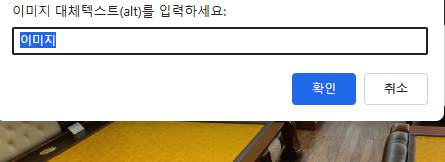
smartteditor2 게시판에 첨부한 분을 위해 간단한 소스 공유합니다.
예시 이미지입니다.
/plugin/editor/smarteditor2/SmartEitor2Skin.html
아래 내용 추가하시면 됩니다.
<!-- SE2 Markup End -->
<script>
(function() {
    function attachImageAltEditor() {
        const iframe = document.getElementById("se2_iframe");
        if (!iframe) {
              return setTimeout(attachImageAltEditor, 500);
        }
        const editorDoc = iframe.contentDocument || iframe.contentWindow.document;
        if (!editorDoc || !editorDoc.body) {
            return setTimeout(attachImageAltEditor, 500);
        }
        // 중복 방지
        if (editorDoc.__altEventAttached) return;
        editorDoc.__altEventAttached = true;
        console.log("SmartEditor2 이미지 ALT 편집기 연결 완료");
        editorDoc.addEventListener("click", function(e) {
            const target = e.target;
            if (target.tagName === "IMG") {
                const currentAlt = target.getAttribute("alt") || "";
                const newAlt = prompt("이미지 대체텍스트(alt)를 입력하세요.", currentAlt);
                if (newAlt !== null) {
                    target.setAttribute("alt", newAlt.trim());
                }
            }
        });
    }
      setTimeout(attachImageAltEditor, 500);
})();
</script>
추천
3
3
댓글 3개

감사 합니다.

편하게 사용할 것 같습니다. 감사합니다. ^^

감사합니다.


